
Better, optimized bone selection sets
Selection sets are currently available as addon, however using it is clunky and slow. I have a few suggestions to make working with selection sets a lot smoother:
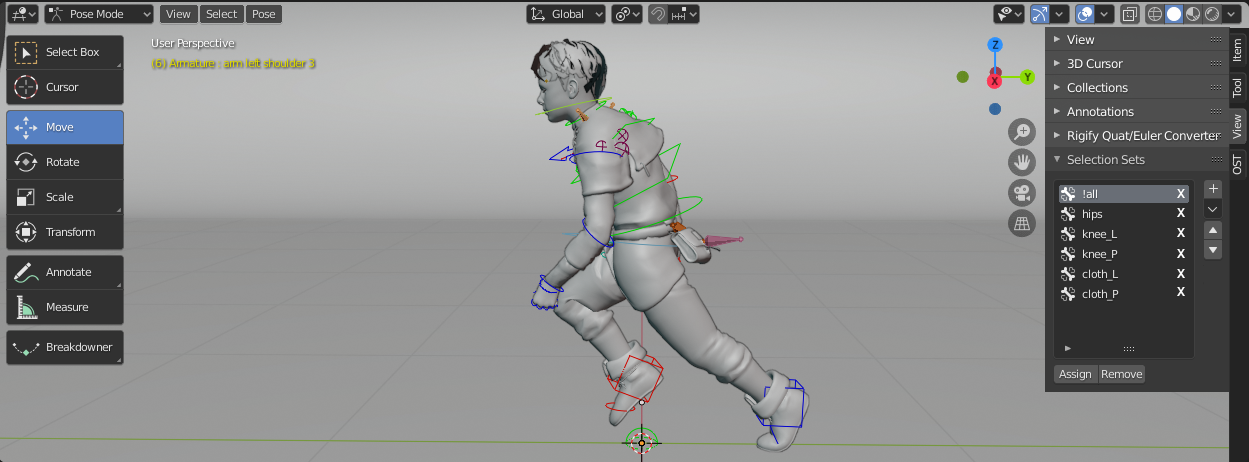
- Move the selection sets dropdown from armature properties to the sidebar at the edge of 3D viewport. It'd appear only when working in pose mode (see picture).
- Give ability to select bones by just clicking on the given selection set. Right now user has to choose desired set and then click "Select" button at the bottom of the list to highlight the bones.
- Multiple sets could be selected by Shift+left clicking items on the list.
- Clicking on a set without holding shift button will highlight only given entry and deselect everything else on the list.
- Shift+left clicking already highlighted entries will deselect them.
- User should be able to remove each item from the list by simply clicking X next to desired set's name (see picture).
Hotkey suggestion:
- Ctrl+[number] - highlight only given set depending of its place on the list (1 = first, 2 = second, etc).
- Ctrl+Shift+[number] - add the sets with corresponding number on the list to selection.
I'd love this to be implemented, I'm sure the overall animation workflow would become quicker.
5 Comments
In developement... Did I understand you correctly? You want selection sets to be implemented directly into blender, not longer as an addon?
* @Blender Defender * Yes, I see no reason why they shouldn't be.
It would be pretty cool if you could assign those these to the quickfavorites, but that would probably require a competely new global implementation for selection sets that exceeds Pose Mode. (hint hint)
What a masterplan!
Thank You sempiro, i was going to ask the same question. :)