
Freestyle animations 2D Speed Lines / Motion Lines
It is an idea where you have parts move and the moving part has motion lines for better 2D looking animations
It could be some function where the Freestyle just detects fast movements/ are keyframed and based on that they shoot out lines in the opposite direction of the movement making curves ecc depending on the movement ,
all shooting out from the arm/meshpart based on where the camera is facing (so you don't have 1000 of speed lines touching eachother and createing a black /coloured mass )
This would be doable if there was a way to have Game Engine Type of visual effects not sure how to do it personally , BUT it would be amazingly integrative to the 2D looks of Freestyle
6 Comments
What do you imagine the user controls for this would look like?
In it's current state, this really isn't an actionable proposal.
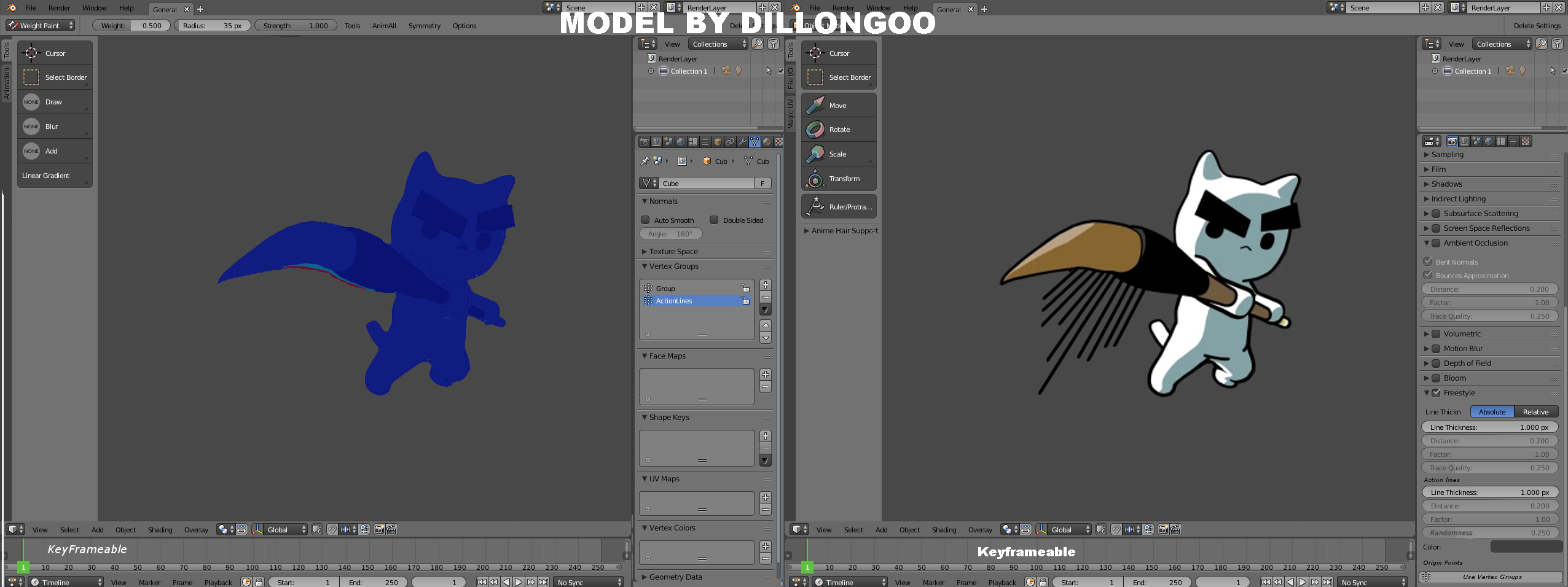
it would be Sliders , that tell you the speed factor or the direction and maybe u use Vertex groups or something alike , to chose places where these Lines will come out from and sliders will tell you how long they are , how much variation in lenght between them its similar to the Hair particle, but better as the hair particle is pretty annoying and hellish to use for many things expecially this ,also they are not keyframeable as far as i know
having this dedicated hair particle that are actually speedlines and that are not affecting the render because they are rendered only at the end when the Freestyle layer is applied
@porkeehunporki6669999: This is where it would be really useful to include a mock-up that shows what you imagine it would look like and how you imagine a user would make use of it.
@Jason van Gumster: Allright i done the mockup to the best of my Noob Abilities of visual explanation , insthead of Weightpaint (and having multiple VertexGroups for multiple places) alternatively it could be done with Ctrl+E and chosing an option in the same location as Mark as Freestyle ,called something like Mark as Action Line Origin Point, to mark what polygon edge shoots out action lines ..
Ps:i forgot to add a slider and button that specifies The Direction the lines shoot out , and the selection of which VertexGroup to activate and keyframe
@porkeehunporki6669999: This seems like something that's doable now with particles.
That said, I'm still a bit unclear as to where the controls for this would be. Would you make a separate set of Freestyle lines and mix them in the compositor, or would these action lines be part of your default line set?
@Jason van Gumster: it would make sense to put it with what would make it the most efficent , i don't know how Freestyle specifically works in how it produces lines ,
but i think some kind of code that jus takes in account the camera location and rotation ,and the freestyle lines that need to be displayed and the VertexPaint/EdgeMarking , and then just expand the Freestyle lines in the specific area more till you get those barred lines ,
it could even be put to a more generic method , where you can achieve Freestyle action lines ,
but the method itself is used for something more genreic like having more customization upon the lines giving you the ability to expand the Freestyle lines as much as possible to get different Stroke Styles ,making it more organic ,
Textures and imprefections ecc (which can partially be achieved right now but still can't get them to shoot out little paint webs in order to emulate 2D as much as possible)