
Correct text editing shortcuts on Mac
Blender has implemented most (not all) of the common shortcuts for text editing.
See
the list here
. I guess there’s
more
but I'm fine with the selection.
The thing is – some of those are wrong on the Mac.
And they are not used rarely.
Every time I type an objects name in the hierarchy, a filename in the save dialogue or rename a Material… you know, not a huge deal but a daily annoyance that really adds up.
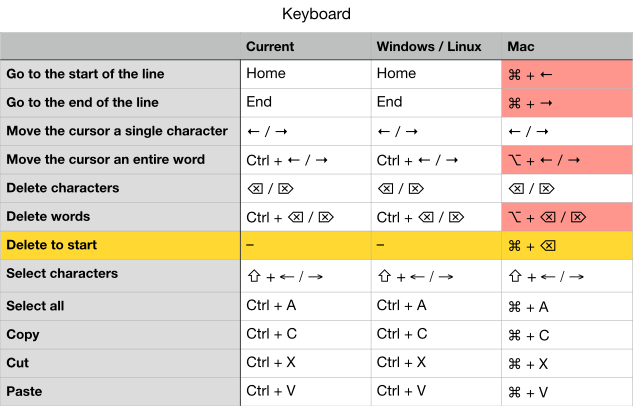
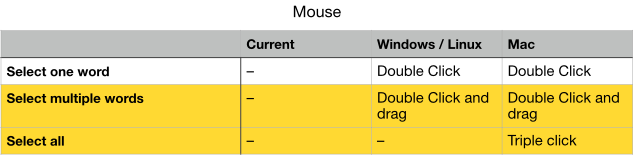
Here is an overview of the most common text editing shortcuts.
red = wrong
yellow = not implemented
5 Comments
Triple click to "Select all" doesn't work on Windows either, now that I test it. It works in everything except Blender. Good spotting and something that should be changed! Big thanks for the descriptive table too, that's very helpful.
Some Mouse improvements here: developer.blender.org/D10261
I submitted a Patch: developer.blender.org/D15619
Very excited to learn that this is in development!
Based on Mac conventions, I would these notes:
When using keyboard shortcuts to move the cursor, if you also hold Shift , text should be selected along the way. For instance, if you press Shift-Command-Right on a Mac, all text from the initial cursor position to the end of the line should be selected.
The chart says that Triple-Click should select all. In the code editors I've used, Triple-Click selects a single line of code, or more-specifically, all text between carriage returns, and including the carriage return at the end of the line. Triple-Click+Drag selects a whole line and then selects more whole lines as you drag up and down, making it easy to select a big chunk of code without missing any characters at the beginning or end. This is especially great if the text editor allows dragging the selected text to a new position — but that's a whole other feature request!
funnily enough text editing behaves slightly different when editing text on a text object in the viewport. :-)