
Right click select context menu for the asset browser and blender file browser
I was going to write a proposal for a context menu in the asset browser, and I just discovered right now that it already exist, but only bind to the W key...
And there is also already one for the blender file browser..
So my proposal won't be to add a new context menu (as it already exist), but to make it available to right-click select users (just like the right click works in the rest of blender interface, even with right click select option)
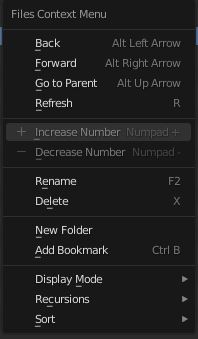
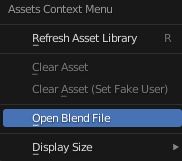
I think a refresh thumbnail on the asset browser context menu would be useful (instead of going to the N menu)
And a "open blender file location" that allow to open the asset library location of the current asset.
And the shortcut F5 to refresh (in addition to the R key)
The generate preview button should also work with all selected asset if you SHIFT+CLICK
The clear asset should work with all selected assets (or allowed to work with all selected assets with SHIFT+CLICK)
CTRL+Scroll Wheel should switch from tiny, small, regular, large thumbnails, and the CTRL+MMB drag too.
Double-click on an asset should open a new 3D viewport windows with only the asset in local view, to inspect it.
The catalog system to sort all assets is great but lack of thumbnail to preview only ONE asset in a given catalog, currently there is only text, and if you go to ALL it shows all assets in sub catalogs.
When you move an asset to a catalog with drag and drop using another asset browser context window inside the same blend file, the list don't auto refresh.
The Down or Up key should change the current active catalog when the mouse is over the asset browser.
I'm sorry if my proposal have many feature in one, should I make separate requests ?
0 Comments