
Select Project
Bright idea: create a tool that works the same as knife project (more or less) except the effect is to select or deselect vertices, edges, and faces, rather than create cuts. Polygon A projects onto polygon B; everything on polygon B falling within the projection toggles its selection state. For complex meshes this could be a huge time saver.
12 Comments
Do you have any examples where this might be useful?
* @PTCreative * I create a cylinder of 180 vertices. I want to extrude a 4-degree section with 12-degree separation between extrusions. I have to count vertices in top-down view, select what to extrude, cursor to center, <S><Shift-Z> and drag. With this feature I could duplicate a 4-degree segment, create a wedge out of it, <SHIFT+D><R><12>, then <SHIFT+R> 14 times to cover the entire cylinder. Then apply the feature.
Anywhere that has to have some repeating pattern of vertices selected within an array of vertices could be a potential use for this. I don't know how many people are aware of the number of commands available after hitting <SHIFT+D> and before hitting enter, but that helps a lot. Still, this would allow any polygon to act as a selection mask over any other polygon in a single command.
By extension this could also allow a polygon to block vertices from selection in another polygon. Then you could Ctrl + A on the target polygon and still leave a specific area unselected.
* @chris4mitzi * I see, usually for this I would use circle select in combination with Checker Deselect which has a few options. Also select Next Active (ctrl+shift+num'+') can be useful for selecting patterns, although it won't work if the cylinder has an ngon cap or if edges aren't connected. I can see the benefits of what your proposing though, even when selections are saved as vertex groups using a mesh would be a quicker way to re-select sections. Presumably it would work a bit like a boolean with positive, negative and overlapping selections.
* @PTCreative * It would give a better visual representation of what's happening, especially when the "selection polygon" is being built and sized. I've had enough cases where I had a large mesh that required very tedious "select 1 vertex, skip 5, select 1, skip 5" type of thing. It's easy to get road hypnosis and make mistakes in those types of cases, when there are literally hundreds of vertices to select, which makes the task even worse. In overlap areas, I think it would be best to just toggle the selection state of vertices falling within those areas. If this were implemented, it would also be a really good time to fix the snap system. I even watched a tutorial video a few days ago that talked about how broken it is. It misses targets completely far more often than it hits. In particular, snap vertex to line. That would be the single biggest time saver on planet Earth, at least for me, if it worked, and it would be indispensable to making this overlay thing work efficiently.
* @chris4mitzi * Yeah, there's been times when snap seems broken to me , it turns out some functions are context sensitive, so snap with modes actually only work in edit mode but are still appearing when in object mode
* @chris4mitzi * btw how would you chose the selection object? multi selection would add it to edit mode where they would draw over each other and be a bit confusing.
* @PTCreative * The same way knife project works. Select an object, it becomes the mask; shift-select another object, it becomes what the mask affects.
Or, you could use a special key combination: CTRL+SHIFT+ALT+B+L+E+N+D+E+R+R+O+C+K+S.
No? 🤣
* @chris4mitzi * oh so it would be more like a 2d projection, I was playing around in python and made a fairly simple script that works using the 'selection objects' to 'active object' approach. It works for vertices that are matching co-ordinates and has an accuracy control. But when I get time I'll add a volume option. The only issue with the 'active object method is its always a bit of an unusual way for selecting things, as with knife projection.
The other thing that I find awkward is now that Blender has mutli-edit, the projection object also end up in edit mode, unless you start in edit mode and then select the other object. Here's the Proof Of Concept code, also works for multiple selection objects and best to be in vertex mode, just copy the script into the Text Editor and hit Run Script to execute. github.com/OtherRealms/Experiments/blob/master/Selection%20Objects
* @PTCreative * Thanks so much ... I've been in hibernation for the past week so I am just now seeing this. :( I'll see how this works out!
* @chris4mitzi * Hi, I made it into an add-on, github.com/OtherRealms/Selection-Objects The 'volume' mode could be improved for performance, perhaps I'll see if I can submit it as a packaged add-on although I'm sure it would be better built-in.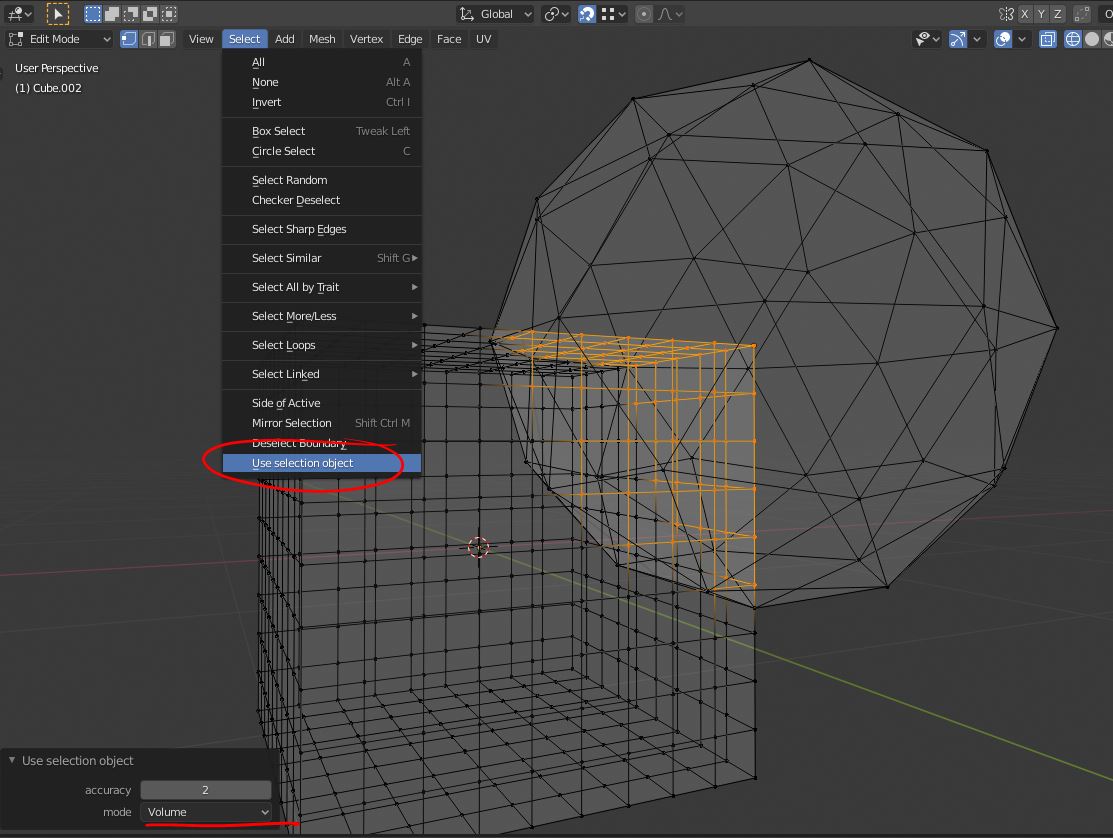
* @PTCreative * You are awesome! Thank you! I'm only seeing your post on 6/19 because it's the first time I've signed on since 19 May. I will go retrieve the add=on! Thanks again!