
Include incremental button in ctrl+s saving dialog
Hi there :)
I often use incremental saving so would like to click plus button without opening blender file browser.
Here is a mockup of what I mean.
Thank you and happy blending!
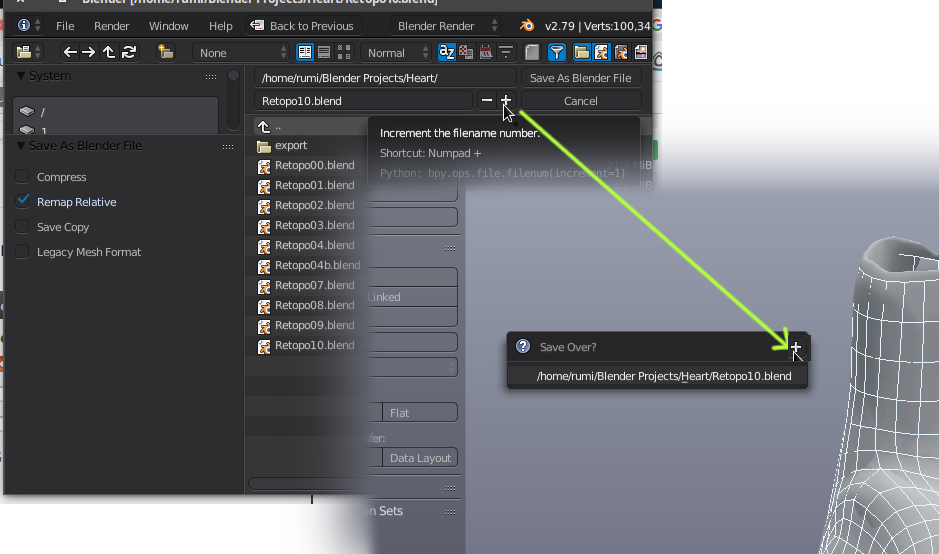
This idea was marked as a duplicate of Add save incremental to File menu.
15 Comments
This is already in the Pie Menu when pressing "Ctrl+S"; though I would suggest that Pie Menus should be more flexible and allow easy UI for user configuration of desired tools/functions; instead of only what is pre-configured.
@mcolinp: Yes, give this feature to me now. haha
@mcolinp: Yeah ... I wish "Pie Menu Editor" was a default addon. I’d throw a lot of money at the creator to make this happen
Or add a "save incremental" entry in the File menu
andas in the "save file" Pie menu?@loic.dautry: As far as Pie Menus; there already is an "Incremental Save" option when pressing "Ctrl+S" . . .
I meant to write as in the "save file" Pie menu
But I failed badly :')
This is neat idea. My only concern would be the possibility of a mis-click on that button when the user didn't really mean to do it.
Maybe when a person clicks the button, it doesn't instantly confirm. Instead, it just updates the filepath in that pop-up and you still have to either click that or press <kbd>Enter</kbd> to confirm.
@Jason van Gumster: too many clicks then. I agree that it should be clearer on what it does though
CTRL+SHIFT+ALT+S save incremental version (skip browser menu). This was a Softimage addon that did this, and it has been.. really useful.
Why we just use like krita preset crtl+ATL+s
I want this also, but in the File menu under Save a Copy. Save and Increment. and those .blend1 are more for backup than versions. I've disabled them, never really helped me anyway when something has gone wrong - and I have better version control software to handle that aspect.
@Martin Lindelöf: I use proper version control on my .blend files as well, but the .blend1 files actually have worked for me as short term project versioning.
Granted, I'd love to have better version control (tight, granular integration with Mercurial or Subversion would be fantastic for me). But in a pinch, the existing feature does actually work.
@Jason van Gumster: This was my point in my earlier comment. The current implementation is better than nothing but could be much improved. I like the idea of a single file with many save points; which can be rolled back; perhaps in an interactive fashion to show what state each point was at.
This may be a slight rabbit trail; but I would also like to see incremental saves as states for a single file. Meaning the file can retrieve a saved state much like "snapshots" on a server. @admins: If I should create a separate Post for this let me know.
@mcolinp: That's already supported. It's what the .blend1, .blend2 files are. You can run that up all the way to 32 if you'd like.