
Add "Layout Nodes" workspace and workflow <3
Coming over from Pixar's RenderMan and Houdini Solaris to work with a small team on a Blender-based project, it quickly became clear to me just how much I'm missing a non-destructive, node-based layout and rendering workflow.
Just imagine how powerful of an addition it would be to Blender to have a fully node-driven workspace — Where we can work with objects, properties, cameras, lights, and render settings procedurally. Load an asset, build a scene, and easily create variations by for example overriding a material to show a different color, adjust the camera, tweak the lighting. All without breaking the original setup and when making changes to the original setup, those will automatically be applied everywhere.
Blender’s Outliner, Properties, Render Settings, and Scenes could be merged into a single, unified, node-based system. Allowing every change to be non-destructive and visually clear, as they are all invoked by their respective nodes.
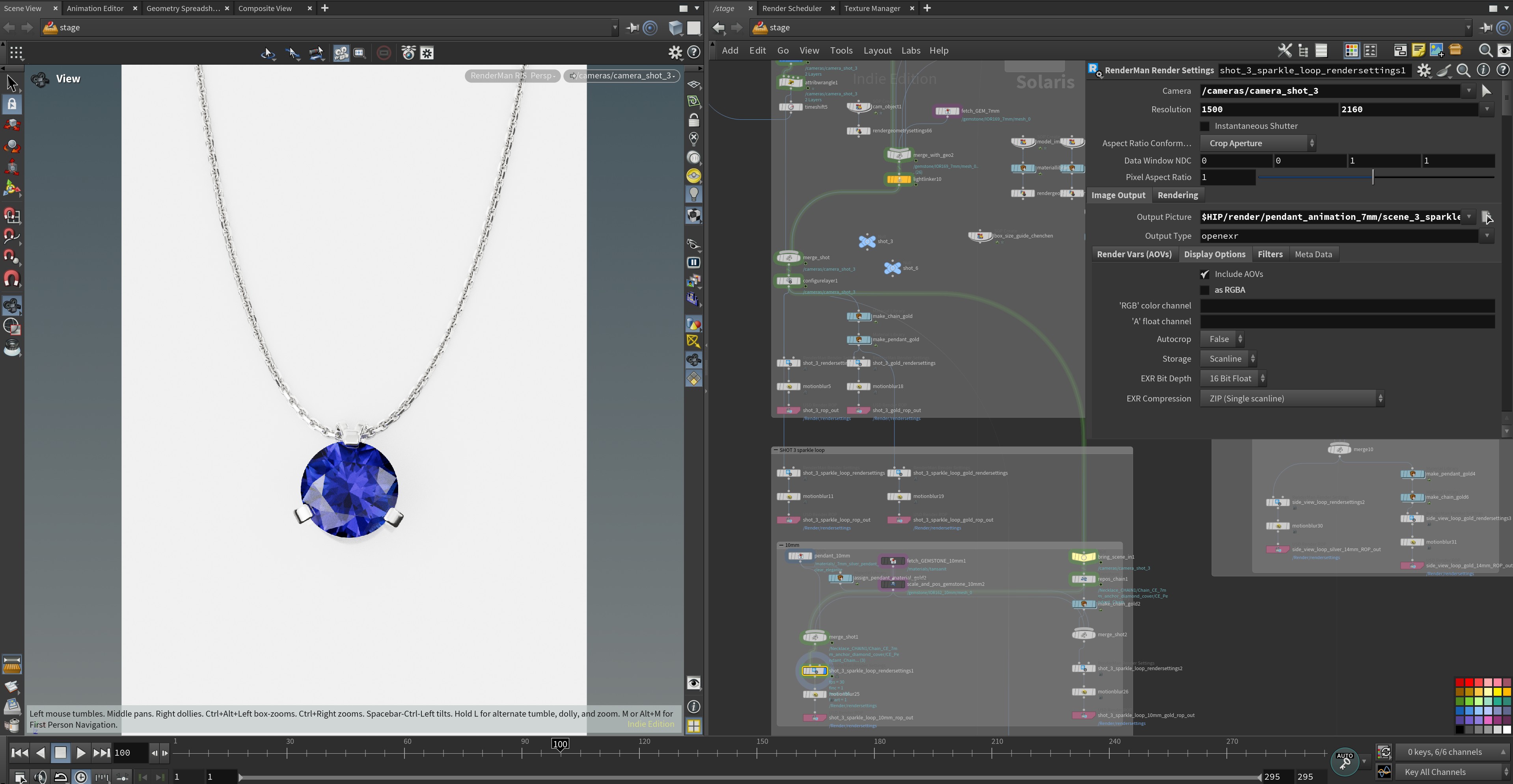
For complex projects with multiple shots, camera angles, and various iterations, this would be a complete game changer. Being able to see everything as nodes, to make a change once and have it apply automatically across the project, would save an incredible amount of time, especially when working with multiple people.
Thanks for considering my proposal - have a wonderful day ^^
2 Comments
You definitely got my upvote, but I do wonder if the "powerful" addition as you put it would also mean a more complicated experience for users who are already intimidated by Blender's apparent complexity. It would be great if this could be implimented so those who want a simple, high level solution never have to touch nodes or consider any low level logic, but also offer complete node control for users who seek it (Native Instrument's "Reaktor" is a good example of allowing a workflow anywhere in between both extremes).
Hey, thanks for the upvote and feedback!
I'd place Layout Nodes in its own workspace, so users who wish to stick with the current workflows are unaffected.
But especially for new users, this would make Blender a lot easier to get into as it addresses three of Blenders biggest issues.
-- Cluttered UI -> Instead of searching related settings throughout multiple menus and tabs packed with irrelevant options. Press Shift + A and drop the node you need, tweak its parameters right there.
-- Messy look-dev, asset links, shots & overrides chaos -> Every asset, light, camera, and override is a wire you can follow, mute, or swap — perfect for new teammates and multi-scene or otherwise complex work. Add a Switch node to swap objects, materials, HDRIs, or cameras live in front of clients or for yourself to see what you like best.
-- Steep Learning Curve -> The logic of nodes always works the same, no matter the node, its parameters or connections. Making it easy to get into and learn only the new node functions one actually needs for their project, or to copy specific parts previous projects.