
Make "Install Add-on From Disk" a button again
In Preferences › Add-ons, installing from disk is one of the primary tasks a user might perform, but it's hidden in an unlabeled dropdown. In older versions of Blender, there was a clearly labeled button. I think that was a better UI, which should be restored.
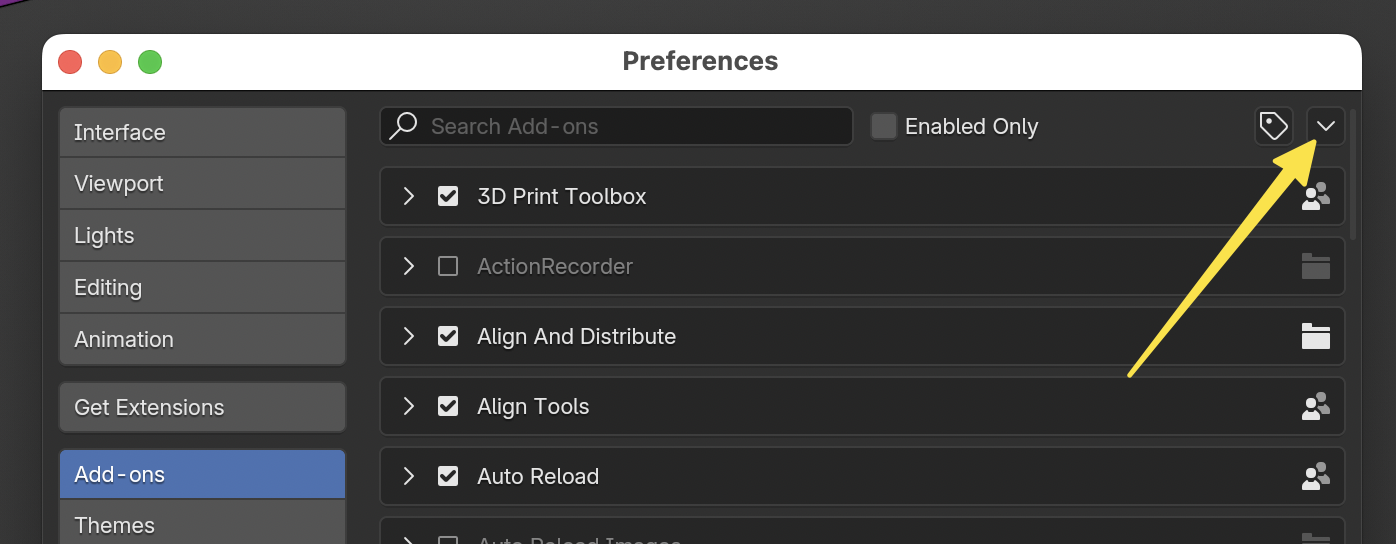
(And I know people in this forum like to offer workarounds, but that's not my point. I know there are various ways to install an add-on, I'm just saying the primary UI is unclear and could be improved.)
11 Comments
Yeah the UI of both "Get Extensions" and Add-ons tabs need a revamp.
I just saw in one of the other feature requests that it will soon be possible to get assets from the Blender server as well. I certainly hope that isn't implemented in the Get Extensions tab, buried in Preferences. It seems to more sense to put the various downloading tools in a number of different places in the UI.
Just drag & drop zip files inside Blender.
Absolutely, I hope Blender stops following Andrew's slope of technologism that has capitalist incentives, and Blender continues having a one-click solution to install offline addons as usual. I hate having such cluttering and obstruction for no actual reason...
Please make install from disk and refresh a button again
100% This dropdown is the least descriptive thing of Blender.
Maybe we should remove it altogether so that only reliable, and maintained add-ons are in use. And the new way of managing add-ons is way better with search, download and update.
How will people install the add-ons they write for themselves or their production?
So I should have to recode all my personal add-ons, that I haven't shared, and also have to upload them to a repository??
No thanks.
Nothing stops you from writing ad-dons in to the directory, after all you are writing add-on and saving it in to directory to test it. What do you need to install if you are writing add-on for yourself?? Its literary text file in structured folder, and if you want to share it to the public then upload it to central repository so its public, if you dont want then thats fine and you can still send it to your friends and have them use it.
Its sad but good decision that Blender made it in a different place. Some add-ons got that feature where you can check for new version and update right from the menu. Now its available for all of the add-ons.
Why this button bother you, it only bring us more affordance. If you're a crazy linux skyzo then you wouldn't even have the emotion of any buttons and would stick to non-gui ux. I really absolutely don't see why this install addon button bother you, it's a simple one click install button that automatically unzip and install addon. It would be viewed as a relief to have it (and the opposite if removed).