
Output Render resolution UI missing
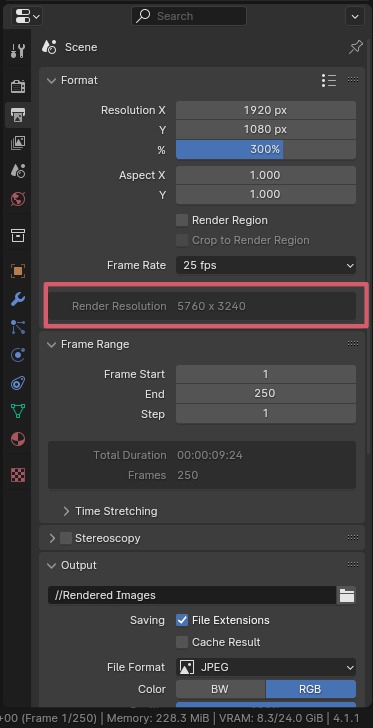
Hi, a display I've been missing is the
Render Resolution
calculation after changing the Resolution Scale percentage in
Output
, Format.
It was available in 4.1.1, but since then, it has disappeared.
I don’t remember why, but personally, it bothers me.
I haven’t found an alternative other than calculating it myself.
It seems so logical to display this result—do you know if it’s possible to bring it back?
Thanks!
7 Comments
It isn't disappeared, it's part of the Amaranth extension: extensions.blender.org/add-ons/amaranth/
I think what happened is that when you switched to 4.2, where extensions replaced even built-in add-ons, the amaranth add-on didn't transfer, and maybe you forgot it was part of that it.
It's a feature of the Amaranth Toolset addon, available on the official Blender Extensions Platform . It was part of the addons bundled with 4.1, though not enabled by default. But since 4.2 most of the non-core addons were moved to the extensions platform instead, since the platform gives users an easy access to addons while keeping Blender lightweight out of the box.
finally, yesterday I found the solution to the 4.4 compatibility problem with a little help 😊 projects.blender.org/extensions/amaranth/issues/8
Ooooh so there IS a bug 🫨
yes, thanks guys! Now I remember Pablo talking about it in a Blender Today. Unfortunately the addon doesn't work properly, it launches and works but doesn't stay saved in the pref, but that's another story... Thanks for your help!
You can always manually save preferences using the burger menu in the preferences' bottom left corner.
I think this proposal should be marked as Archived.
yes, it is but it didn't work due to an error in a call to an old command