
Refresh Sequencer: Combining the Compositor with the VSE
Disclaimer: the mock-ups I prepared aren't serious UI-proposals, they are just intended to explain the concept I have in mind. Have fun :)
The Problem
Working with Blender as a Video editor can be fun, but as soon as it comes to advanced color grading or adding secondary grades, masks, your project will become very messy and hard to control.
The Dream
Making Blender a powerful application for Color-Grading and Video compositing similarly to DaVinci Resolve. Most of the tools are already there - you just have to bring the tools together in a usable way. Combined with the fully-fledged 3D environment, Blender could be an excellent tool for video editing and color grading.
The Ideas
A real time compositor
I'll write down the one that is the hardest to implement first: I believe Blender should have a (somewhat) real-time Compositor that can run simple compositions in real-time. One the one hand, EEVEE renders could run even faster when composition applied, on the other hand, it'd give the foundation of an advanced color-grading workflow for video editors.
Multiple Compositions
To create a more powerful workflow for Color-Grading and Compositing tasks, I believe the idea of having multiple Compositions is very useful. Comps behave a bit like materials for 3D objects. You can assign as many Comps to a video strip as needed, and assign a Comp to as many video strips as you like. This way, the modifier tab, the transformation and even the blend modes in the strip properties become obsolete – you can easily tweak all these values inside different Compositions.
example: With Color-Grading tasks, you can easily assign a grade to every clip of the same shot and edit them all together

Combining the sequencer with the compositor
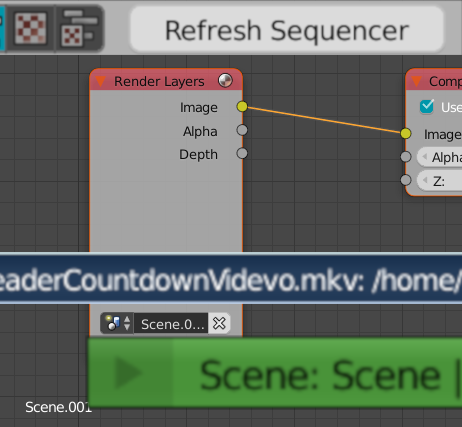
Sometimes, deciding between a node-based and a sequencer based compositing workflow is a hard decision to make. Using nodes, you have much easier control over your visuals, but it is hard to work on longer sequences – and the workflow is quite impractical if your sequence contains cuts. If you combine the sequencer with the Compositor, every strip that is assigned to a composition will appear as a videoimage node in the composition. Adding videos or images in the node editor also allow you moving around the strip in the sequencer
Strips can be loaded into a composition in two different ways:
• combined : this is the default setting for strips: all strips with this setting enabled are loaded as a single, combined input node. This way, every strip will be edited and composed equally
• single : every strip with this setting enabled will be loaded as an individual strip into the composition. This is useful for blending in different assets, such as film grain or letterboxes
Furthermore, it could be a cool idea to choose whether the composition can have multiple outputs for individual video strips for even more possibilities
*example: Adding Lower thirds and title cards that are influenced by the video that is below are fairly easy to make

An updated way of working with keyframes
Moving around and adjusting Keyframes in the VSE can be an extremely tedious task: as soon as you make changes to your timeline, many of the keyframes are out of sync. To make the workflow fast and efficient, the keyframes should move along with the strips they are relevant to. There are different attachement types:
•
global
: the keyframe is only attached to a very specific frame of your project, and won’t move along with any strip in your

•
strip
: the keyframes are attached to a specific frame within the loaded video strip. As this is the most logical behavior for most animations, this will be the default attachement type

•
start/end
(with offset): the keyframes are attached to the start/end points of your trimmed video. This is useful for fades and transitions.

• strip selection (automatic/manual): As compositions can include many strips, the automatic setting attaches the strip to the strip that makes most sense. However, it’ll be possible as well to attach the strips to a specific clip. The dope sheet editor and the graph editor are still completely usable – keyframes can be moved around freely.
Quick masking/tracking workflow
The Movie clip editor automatically loads any strip selected in the timeline with the correct range and offset already applied. When loading a tracker/stablize/masking node in the compositor, the masks are selected automatically. This can make stabilizing and adding secondary grades much more easy and efficient.
example: Masks can be easily applied to compositions. Moreover, animated masks would just move along with the strip, as keyframes are attached to the video strip.

Further ideas
• Transform tools: There is already an extremely useful add-on with this name. It enables you to use standard blender operations (g for grab, s for scale…) to move around videos in the viewport. This should be standard and also support motion blur
• Proxies: for complex compositions and for imported 3D footage, creating proxies is very important for a fast workflow. There should be an easy way to create and manange proxies for compositions and strips

• Presets: Presets will be very important as it’ll be time-consuming to create whole grades and compositions from scratch. As asset management gets more attention these days, it’d be a good idea to use similar mechanics there.
• Separating Audio-Tracks/cleaner sequence: in can be quite tedious to work with many tracks in a sequence, so Audio tracks could be hidden in another segment of the VSE – they are still linked to the video files, but hidden when working on the visuals.
• if keyframes can be linked to video strips, the speed adjustment could as well support keyframes. This would be extremely useful for projects involving motion graphics. Reversing videos along with the keyframes wouldn’t be much of an issue, either.
• Loading 3D scenes should be easy to do and to work on. I don't think it is a good idea to see the VSE and the 3D environment as separate things, quite the contrary: quite powerful workflow can emerge
Final words
Naturally, this is not a finished concept, but as I have already edited film projects using Blender, I believe this could go a long way! I'd love to know what you think about my ideas! Rip them apart if you like or think of a completely different approach for this. Thanks for reading <3
4 Comments
I made a proposal for this based on your post: "Proposal: Using compositor nodes on VSE strips" . The general idea in both of them is the same, but there are differences in the details to account for different use cases, and to make it powerful but have it not disturb the workflow of those who use the sequencer to cut footage.
A real time compositor:
I haven't followed it too closely, but it seems like there's work being done toward that.
Combining the sequencer with the compositor:
"If you combine the sequencer with the Compositor, every strip that is assigned to a composition will appear as a videoimage node in the composition."
I opted to not do it this way, since it's hard to tell what strips are controlled by the compositor and what is controlled by the sequencer. Layering also would be difficult to get right when composited and non-composited strips are mixed. Instead in the proposal there's an extra option in the meta strip to include each strip as a separate channel.
"Adding videos or images in the node editor also allow you moving around the strip in the sequencer"
Mostly the same reasoning for this part too. it wouldn't be possible to represent compositor nodes as layers, since they can be overlaid in different ways in multiple positions at the same time. To control the media inputs in the compositor, I'll make a separate proposal for a keyframe editor mode that makes this possible.
An updated way of working with keyframes:
It seems that sequence keyframes have now been changed to be local to the strip. They are no longer global like they used to be.
Quick masking/tracking workflow:
This is a great idea. It would be much quicker to be able to edit everything (masks, tracks, strips) in the same viewport. I haven't included it in the proposal I made as it's out of scope for it, but I agree that it would be a great addition.
For the other differences I've included my reasoning in the proposal.
There are many duplicates of this idea both here and in other places (13 that I could find, and 2 more that are related). I'm trying to gather the discussion on the forum post so that it isn't fragmented all over the place. If you have thoughts on the proposal I'd like to hear them there.
i like it - i like the concentrating of videowork and the usage of the compositor .. and would love to see it come to live - however, colorgrading and mask are not the only things you would want in the vse - there are more and better thought out program-concepts than resolve (just sayin) - i always liked and worked with the idea of a container in witch you would combine anything related to the clip, the cc, the compositing (with layers)with any asset (2d/3d) to the clip, rot/loc/scale on screen and imageffects, tracking, masking, overlaying etc. just for that one clip - if a clip on a timeline doesnt need that love it would just not be a container.. it keeps the timeline tidy and structures your work much better.. (i think) - AvidDS, Ae, Smoke,Flame had this and was from a artists point of view very fast (and very concentrated on one clip/wo losing the big picture)
Really great ideas in here, i would add that the properties panel should be part of the VSE and that strips should be treated as objects, so every effect should be a modifier and live in the modifier panel of the properties and maybe more thing could be done there to keep this consistent, that way we can cleanup a bit the N panel which is a mess.
@Luciano Muñoz: It is a really interesiting idea to work on strips using modifiers, but the idea I had would make the usage of modifiers pretty much obsolete, as you could do all sorts of color Grading and masking much more efficiently using the compositor. I also wonder if it is a good idea to treat strips like objects - would they appear in the outliner with all the other objects? This can be very confusing, especially once you import scenes into your sequence. Most tabs in the properties window aren't relevant for video-editing/color-grading tasks either (the simulations, for example)