
Swap the Up/Down shortcuts for "Jump To Next/Prev Keyframe" to be more consistent with convention
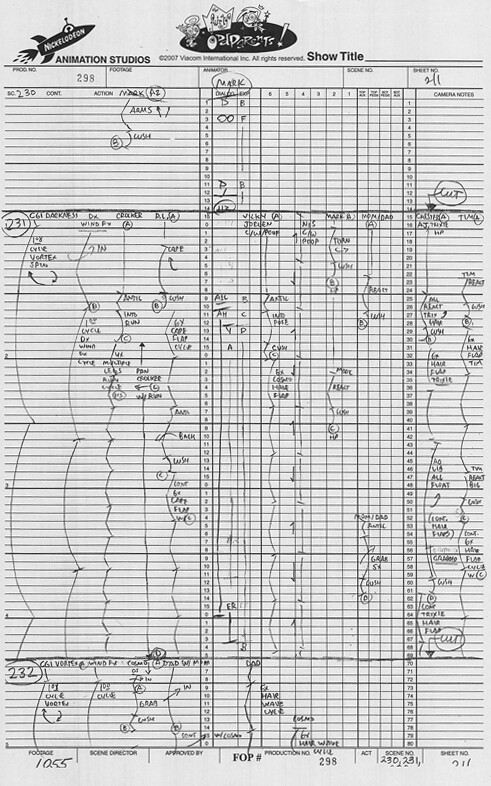
Currently, the default is the Up Arrow jumps to the next keyframe, and the Down Arrow jumps to the previous keyframe. For animators with a background in 2D/traditional animation this is the wrong way round! Dope sheets, timing charts, exposure sheets (aka x-sheets), as well as anime-style storyboards, are read downwards, so later keyframes are down , and earlier keyframes are up. 2D animation software such as OpenToonz and Toon Boom Harmony treat downwards as 'forwards in time' for this reason.
Is there a good reason for them to be as they are currently? Sure, you could argue 'higher number of frames' could be upwards, but I don't think this is a widespread convention - whereas for 2D people, next keyframe is down, and frame flipping is probably the most frequently used shortcut - except for maybe undo - so it's very hard to unlearn :-)
examples of dope sheets: jonahgrimm.com/the-illusion-of-life/the-disney-sounds-part-3-and-exposure-sheets-explained-day-154/
9 Comments
I really agree. DOWN = next makes more sense.
* @Christiaan Moleman * so you actually disagree?
* @-L0Lock- * No, you've misread this proposal. Currently the default is UP next, it should be DOWN next. Read the text again.
* @Christiaan Moleman * i thought you wrote "makes no sense"
Here's a comparison with some other software:
CURRENT SCORE IS 7-1 IN FAVOUR OF UP IS REWIND
Up is rewind
Ctrl + Upto rewind to the start of the timelineUpto jump to the previous clipPg Upto rewind a frame,Pg Downto go forwardUpis previous frameUpis previous frameUpis previous editUpis previous clip / editDown is rewind
Would be great if you have other examples, feel free to add them :-)
I'd just rely on users changing it themselves. Plus swapping them now would really hamper the existing community of adopters who tried to learn the hotkeys as they were originally authored.
I mean, by that logic we shouldn't change anything, we'd still be using right mouse button for everything 🙃
In my editing softwares, it's up keys for next key or frame or whatever. So I'm used this way too. Not sure there's a stronger tendency one way or another, and it doesn't cost much to change it manually.
interesting - I've added a list with all of the examples I've come across, and almost all of them have
upfor rewind - feel free to add counter examples tho