
"Adaptive" unit display as checkbox
I wish the handling of displayed units would be like it was in 2.79 - well somehow. 2.79 wasn't perfect as well, but at least using the "Unit Scale" value set to 0.01 (which is a separate discussion) did the job.
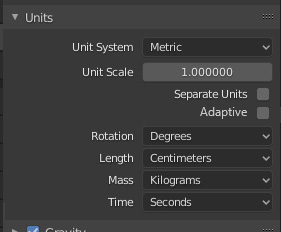
In 2.80 you can either choose a dimension (like Centimeter, Meter, Feet etc.) OR you can choose "Adaptive" (which is a behavior and not a dimension). Those two things should be separated.
The problem is, if you choose the "Adaptive" option, you are automatically assigned "Meters" (when using the Metric system) as dimension and you can't do anything about it. So typing in "10" means "10 Meters". But what if you work in "Centimeters" most of the time AND also would want the "Adaptive" feature, which is very helpful? That's not possible at the moment.
So the solution could be something like this ... (also looks at the GIF animation below)
12 Comments
Man - change title to something like " Separate Scene/Display Units ". Even for me it take some time to get the point what you propose... And maybe not some adaptive ( adaptive to what? adaptive how?) but just two different unit settings.
* @IIIFGIII * As you know, "Adaptive" isn't my invention. It's the label that Blender uses already and pretty much does what I want. It's just that right now it's EITHER Adaptive OR some other denomination. But it should rather be an additional option.
* @Andreas * I just mean that adaptive - is about some changes because of something ( one thing will adopt to other ). So when it called adaptive it bring questions - adaptive what to what/how? Case like cm/m is not only possible, what if user want eg. scene units feets but work in mm?
* @IIIFGIII * Why not. But I would still need the additional "Adaptive" option.
* @IIIFGIII * Separation alone isn't the same. It's also about that "adaptive" part that is important. The internal part is about what unit is used when I just type a number. So "100" means "100 cm". Yet is should be display as "1 m". So your solution wouldn't actually solve my issue.
* @Andreas * So u want to have centimetres as scene unit, type in centimetres but then see in meters? Two people try to understand u and both are wrong. Why not just show such gif instead of all the text you wrote and just one sentences.
" I want it to work this way - I type in cm , I see in m ( as it work in 2.79)."
* @IIIFGIII * Writing text is faster and I described it pretty well I think. Plus, as you rightfully so understood, it worked in 2.79 already. Anyway. With your additional GIF the issue should be more than obvious by now. Cheers.
* @Andreas * Ohh, I finally understood your post. Yeah, I think it would be a nice addition. You'll need to edit your proposal with some gif or mockup showing exactly what you mean. I know writing is faster than making a mockup, but if you want your proposal to be understood and be well received, you should make that small effort.
* @Andy Cuccaro * I'll think about it the next time. Cheers.
Isn't that what Separate Units does?
* @Andy Cuccaro * No it is not. He talk about " separate " scene units under the hood and displayed units to input and handle.
+1 I missed it too after switching from 3D Max. It was really handy to have cm scene units for working with UE but meters as display units to not type all the time everything x100
* @Andy Cuccaro * No. "Separate Units" result in a display like "1m 5cm" instead of "1.05m". Visually "Separate Units" is too overloaded for me.