
More options for reordering Workspaces and Sidebar tabs
WORKSPACES TABS
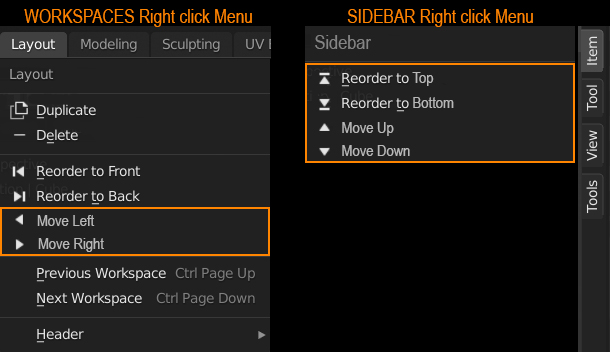
Just add these two in the right click menu. It would facilitate the reorganisation of the tabs.
- Move Left
- Move Right
SIDEBAR TABS
Currently, the sidebar tabs don't have their own right click menu. Instead, when clicking on them (or through them), it's the Context menu of whatever mode we're in that appears. They should have a right click menu on their own with the following buttons:
- Reorder to Top
- Reorder to Bottom
- Move Up
- Move Down
13 Comments
this is a must have
Neat idea! They would have to implement DnD which, as a native python dev. is really hard.
* @SF12 * What is DnD in Python? All I find is related to dungeons & dragons!^^
* @Ryxx * Drag & Drop.
* @IIIFGIII * Ah yes got it! Indeed, Drag & Drop would be much better, but I remember the devs also said this to be difficult. So for the time being, they could implement this (more easily I guess) until the better solution.
* @Ryxx * agreed. It would fix the problem in a way...
* @Ryxx * Drag & Drop
I'm curious about the reasoning by the devs why we can't drag and drop these like in other apps. Are they not using Blender themselves?
"Published 4y ago"
sigh
Drag and drop has already been implemented, you can reorder panels by dragging the '::::' handles.
* @rwees * That's only true for the drop down panels. But the workspaces / sidebar tabs are still unmovable by DnD. But I wonder why they succeeded there and why it's more difficult for the tabs though…
That's in the side panel. Not workspaces.