
Save clicks on "Object Types Visibility" workflow
Hello,
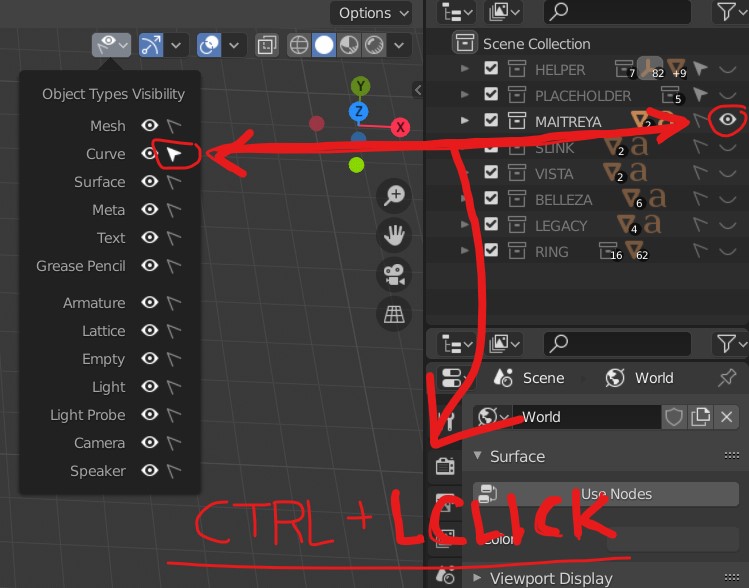
I noticed that it takes many clicks to set the desired setting I need. There is right now no key combination I could use to immediately filter the desired type I want. For now, I must unselect every type I want to filter out.
In the outliner, I can already use CTRL + LClick to filter out the desired element. The same behavior I would expect in other places. :)
gyazo.com/5b16fadcd798111190fe598d7c81ce29
AND
It is also desired that the previous state should be restored again if I "CTRL + LClick" on the same element. Like in Photoshop. Of course, this only should work, if the filtered state didn't change between.
Regards
3 Comments
took me a couple of reads to understand what you were proposing- but now I get it- ctrl+click the eyeball icon to solo that collection.
what happens if you ctrl+click on an object? would it solo just that object, or it and everything parented to it? overall it's a good idea, +1 from me!
* @testure * CTRL + Click on an object is doing nothing in the viewport.
If you have a suggestion, how to describe my proposal in an easier understandable way, please give me an example and I'll exchange or merge your version to the current. ;)
Might not be exactly the same but I implemented Isolate Visibility/Select by Type, and also for Collections in my addon uoza production pies, I prefer pie menus so I don't have to move my mouse and click twice so I focus on my model and less on the UI.