
Grease Pencil Stroke exclusion option for masking
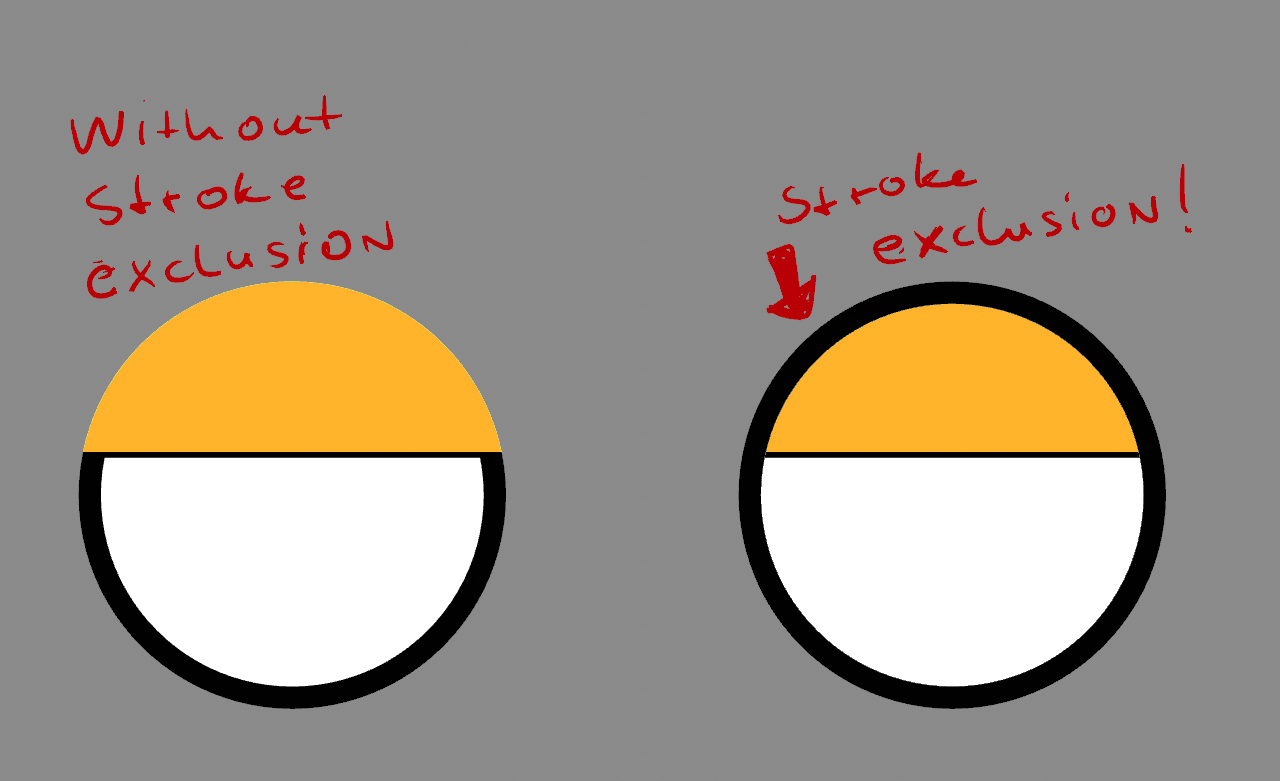
it would make sense to have the option exclude the stroke of a mask for something like eyes. right now i have to copy the layer and turn of the fill to get the outline back . Masking with a simple option to exclude the Grease Pencil Stroke would be super nice .
6 Comments
Both options would be great, like in Moho.
Just tried this in GP, and excluding the stroke was the first thing I looked for. Quite a job to do this manually in a finished animation.
I love this and need this.
similar to the old Adobe Flash feature, which was great, and we don't see enough of in other "drawing" software?
Recently I struggled to find alternate way to do this. I just made a "mask material" which has (stroke=Black, Fill=White). Then make mask layer using this materiual.
This mask layer should be top of hierarchy and layer blend mode to be multiply. Other layer(like eyeball white, eyelid) are masked by this layer.
I could get masked reslut from only white area of this "mask material". Black stroke line is still remaining. This is better because you can deform shape by only mask layer not neccesary to touch the eyeball filling color.
But requiring one additional layer for eyeball color. If stroke can be excluded optionally, will be good help.
This would be extremely useful.