
Bevel edges options
Please add some options for bevel edges(operator and modifier). For now this kind of corners beveled in wrong way for subdivision smoothing.
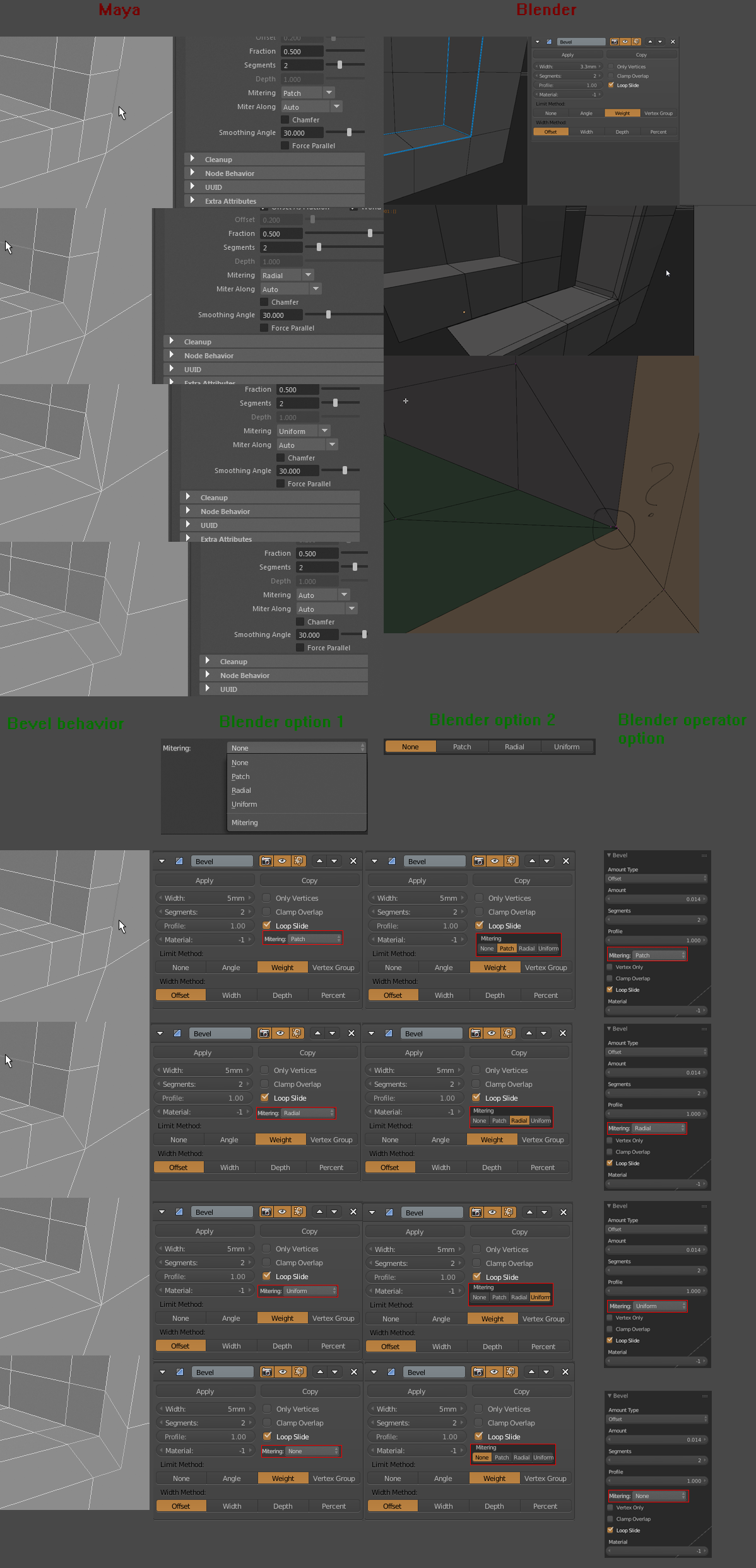
Please add some options for bevel edges(operator and modifier). For now this kind of corners beveled in wrong way for subdivision smoothing.
9 Comments
It would be great to have a possibility in bevel modifier to apply different bevel amount on selected edges - on some bevel more, others less and others don't. And to keep track on that somehow visually on screen, directly in 3D window, not in a pane on the side of it. I know, I am asking too much :) but hey, I love Blender, so why not make it a world's modelling star? ;)
@caddboss: Isn't this already possible with bevel weight? Or are you talking about controlling the number of subdivisions per edge?
I hope we get this feature! :)
Is the a complete replacement or should users be able to control this?
@Jason van Gumster: Both. For now in corners like this 3 vertices in center of crossing edges placed absolutely irregular(It not visible on screenshot, i'll redo it).
Also, I think its good idea to add option, something like "Type of corners bevel". Or "Mitering"... I'm not very good with english. Sorry.
@yursiv: In which case, I would strongly recommend that you add a mock-up that shows exactly what controls users should have available to them, both in the operator as well as the modifier, and what each of those controls should do. A screenshot from Maya is not sufficient.
@Jason van Gumster: Interesting. I wanted to post about Bevels, too, after testing with Maya.
What I find very useful ist this "Chamfer" option. Initially it's turned ON for normal Bevels. If you turn it OFF it will keep the shape and add the support lines what is great to turn a simple cube into a SubD model with subdivided Bevel edges.
@Michael Klein:
Is it maya "chamfer" option not similiar to blenders "profile" option? No chamfer in maya means profile=1.0 in blender
@Jason van Gumster: Reuploaded image with mockups