
Drag and drop images
Hey
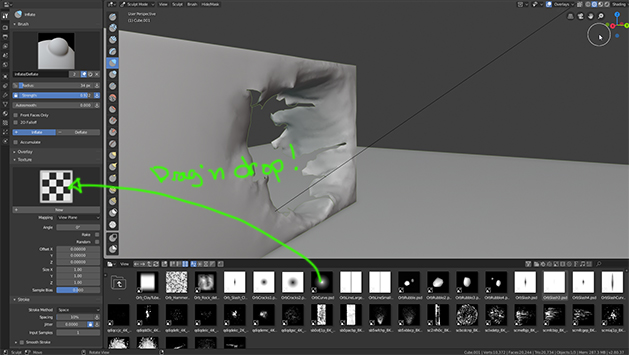
I belive we cant Drag and drop anything from the Blender file browser to the texture tab.
It would be great if this was working by default. Also make a save brush button to save the current brush setting created.
Cheers
Hey
I belive we cant Drag and drop anything from the Blender file browser to the texture tab.
It would be great if this was working by default. Also make a save brush button to save the current brush setting created.
Cheers
6 Comments
i am pretty sure it will be in asset manager
Please note that doing what you suggest would be a macro of a few different operations. Images are not necessarily textures. So if you drag an image to a texture window, Blender has to do the following things:
This isn't to say this is a bad idea, but there are corner cases to consider. What should Blender do if there's already an image texture where you're dragging it? Should the same texture datablock be used, but just pointing to a different image datablock, or should it create a whole new fresh chain? Likewise for if there's a procedural texture already there.
@Jason van Gumster: This is a lot of labour that should be automatized.. I like his intention.
@Jason van Gumster: For sure the easy way of seeing it is to create a single reference everytimes you drag something/image/whatever file frome the file browser.
Add a choosen default preset, depending of the context/file you are dragging onto the box/viewport/graph.... Mabe add a drop down list of the actions you could or can do with the dropped file so there is not much confusion.
if there is already a procedural texture and you drag a static image you want, it is your call at the end.
After if someone want to change settings, there is always the image tab.
what you think?
@fgosselin: Where would you put this dropdown/preset?
Like I said, I'm a fan of the idea. I just think the workflow needs to be well-designed and take some of these cases into consideration.
**@Jason van Gumster: I would show it on mouse release location. Or as a pop up like the " F6 " menu on the viewport because it wouldn't overlap with all the info in the tool view.
Append brush could also work well with this method. If you don't want a messy brush palette.