
Quick Favorites - Resort & Command Naming
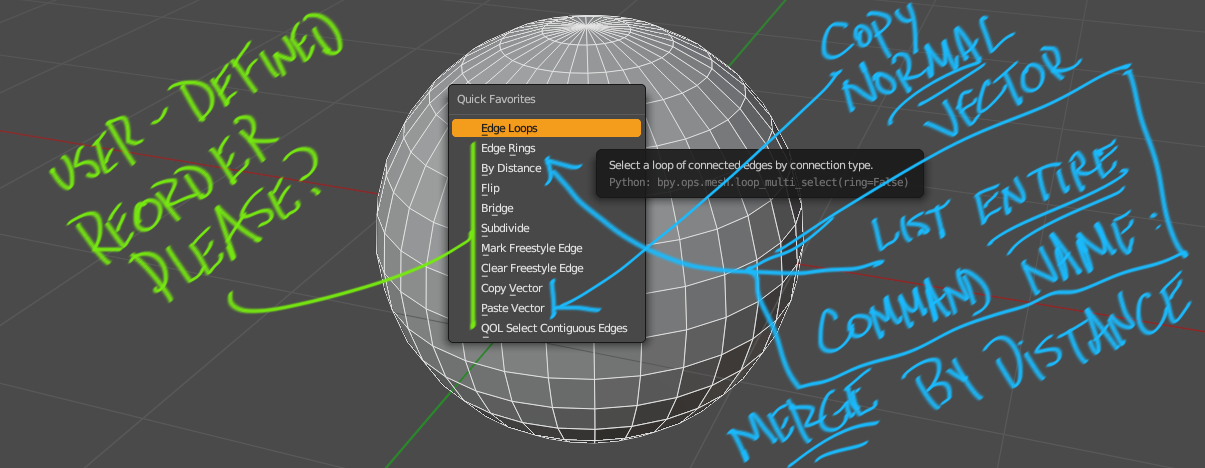
-
We need to be able to reorder the commands in Quick Favorites. Personally I don't care if it's in the app, or a exported text file i open in notepad, or a .json file. Anything would be nice.
-
Either the 'auto filled' command should include the entire proper command (ie, include the prefix), or allow the user to change the menu text ... which might be trivial, if I could open the list in notepad or edit a .json file.
7 Comments
+1, the unorganized nature of quick favorites, as nice it is, makes it annoying and visually unpleasing to use. Adding dividers would be a nice idea too.
I agree with all of the above but somehow think implementing such feature would get away from the concept of “quick favorite”. I personally ended up using the PME and creating Quick Favorite pie menus specific to different contexts (viewport, outliner, etc).
Why does wanting to reorder them , get away from the concept of "quick favorite"?
Just because I happened to add a command to that list last week, does not mean that I want it in list position #6 in perpetuity.
As to PME, some find it too perpetually buggy to suffice as an alternate.
Wouldn't it be nice to have the Quick Fav as a Pie menu und you organize your Fav's by yourself?
I greatly dislike Pie Menus, and those are a different feature set anyway.
I prefer commands to be listed in a sensible vertical menu, not in a circular graphic that requires me to play Where's Waldo to perform an action.
YES PLEASE PLEASE PLEASE IMPLIMENT THIS !
We could arrange the order in the same way as the settings menus