
Categories/filters for textures in the file?
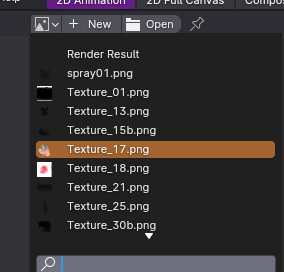
In Blender, Dropdown menus that show textures showcase all the available image files that are used in the Blend file.
This includes all types and extensions and all usecases: hdrs, brush textures, textures used in materials, render result... EVERYTHING.
This makes it unpractical to find the texture you want, unless maybe you name it and type that name in the search area. I also avoid loading brushes in my startup file so that I don't have a long list of images to navigate through whenever I want to use a certain image.
I hope that the brush manager that's coming will solve this issue, but it might as well make it worse if we'd see all the brush textures in this list.
I propose that these dropdown menus should have filters (e.g: by extension, or depending on where they're being used if possible, maybe even an option to hide the texture you want from these lists...), or maybe a system to add textures into categories that you can choose from next to the dropdown icon.
4 Comments
Lol, I agree, the textures management looks and feels like an old accounting software.
blender.community/c/rightclickselect/1G9V/ Improvement for Render Result window - tools, progress
This seems to be like another issue. having a system that filters/categorizes all sorts of textures would definitely help in separating render results though.
Similar but in other place, as editor after render.