
Direct render of individual ViewLayers to Disk. Current state produces Memory Errors
TL;DR: This proposal is meant for people who have to rely on Rendering in high resolution and/or are using mre than just a few View Layers. This is a severe stability proposal! And if you rely on View Layers and high resolution in, say, print production or 4K+ resolutions please keep reading.
Current state:
If you use several View Layers in one Blend File on higher resolution Blender will reachyour system's RAM ceiling quickly because every View layer with passes has to be rendered and kept in memory before it can be processed or even written to disk .
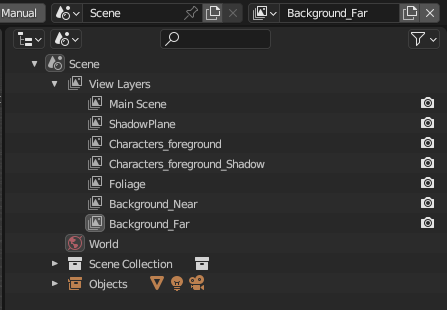
Example: All of these currently would rendered entirely to memory before Blender is able to save them to disk and set the Memory free again. If the Memory reaches capacity before files can be saved, then the process will halt and all render progress for the frame be lost.
This means that if your renderings just freeze or throw errors and you don't know why - this is why. Blender has very likely hit your system's RAM ceiling and you don't even get any of the renderings done up until this point! It's terribly unpredictable because you have to calculate the number of view layers used together with the render output size plus overhead for the render system and program. If that becomes larger than the available RAM on your system or Renderfarm, then Blender will quietly render all layers until RAM is full and then hit error after error. And again: you will end up with no output until this point in time because Blender keeps everything in RAM befor writing anything to disk .
Why is it like that?
I can only assume but it's probably due to the compositor. It's logical that if you use view layers to make compositions and tweaks to your renderings before output then Blender simply cannot logically put anything to disk before all layers are available for composition. In that case it is absolutely needed and makes total sense.
Proposal
Option 1 (Probably easiest and best option)
Have a Bypass button in the "Scene Output" that tells the user: Every active View Layer will be rendered to disk directly. Activating this option WILL disable the Compositor as it is a logical either/or.
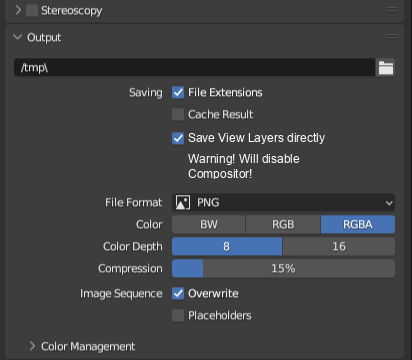
Then Blender would proceed to render each View Layer individually and output it into the specified Folder directly after finishing and flush it from Memory to start the next one.
Option 2
This one would be a LOT trickier but in this case Blender would have to track if the Compositor is active. If not then it would proceed as above. If the compositor is active then Blender would need to track each node path to a File Output node and check if there are any interconnections. If there are then any interconnected nodes would be rendered and processed before being written to disk. Then Flushed from Memory. I am not sure if this is even remotely logically possible, though.
Option 3
Memory Calculator in the Interface or Compositor. Similar to nodes previews in the shader editor there could be a type of system memory calculator based upon resolution and amount of render layers previewed in the compositor. At least that way you could see a direct estimation of how much above budget you already are.
TL;DR - Realistically I'd consider this to be a borderline bug report, since it makes calculations really unpredictable. Yet, I am sure it is currently not regarded as one since it is a design problem and not an actual bug.
The easiest solution would be Option 1, above. In that case any post production compositing would have to be done separately after the fact of rendering. Still better than failing renderings after a few hours of calculation on the renderfarm or splitting up a file into several separate render submissions only to circumvent memory leaks.
Reference: devtalk.blender.org/t/mutiple-pass-ram-management-and-ram-overflow-question/31526/ (edit) Thread is in read only mode because it was deemed a "feature request".
4 Comments
i think this person can help you- blender.community/c/rightclickselect/D0qY/
Another thing i will suggest that blender should make seperate blend file when view layers are more and link all the data to original file. this way each file will be treated like one seperate scene to be rendered and compositing for that file will be setup in that file after render. When it finished all rendering then user can append all compositing nodes if he needed them or he can export them as exr file in seperate compositing program like nuke or fusion because it will be difficult to composite such large data in blender so better to use dedicated compositor.
Not sure I follow, here. How do you propose this exactly? Have several Blender Instances open? Render each Scene via command line from one application? Do you propose rendering different scenes with View layers externally into another open blender instance? I mean - this would theoretically be possible from Python script but it sounds awfully complicated and I am not sure it would work very well on a renderfarm, for example. It also is pretty much already possible if you just use the compositor with references pointed into a directory and then render all your files into said directory. Then update. You'd have one compositor project to work in. That is not really what this proposal here is about, though. This is about a technical lmitation that could reasonably easy be circumvented.
The problem here is precisely that all of the renderings are not supposed to be separate files. Separate files with one view layer would in most cases render fine. But it's not desireable to split one scene that renders the exact same thing arbitrarily into different batches of View layers manually. That is the point. It's messy, unnecessary, unintuitive and clogs up the renderfarm or system for something that should be a one-machine task.
And yes - this took a few days and many failed attempts on the Renderfarm to figure out and pinpoint. We tried to let it run and initially one render job simply retried for 5 days before we stopped it. The actual render time with view resolution below RAM limits would have been ~1-6 hours per frame depending on the amount of samples.