
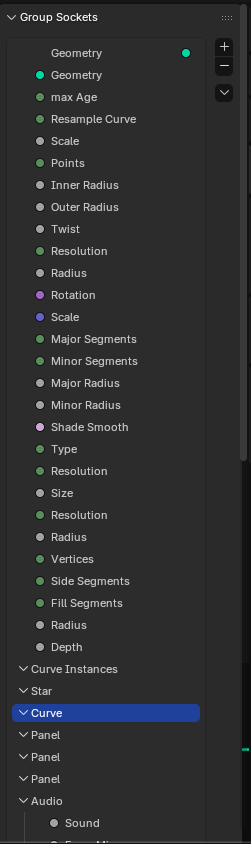
Center the +/- in the Group Sockets menu, have it move down as you scroll
When the list gets long, it gets really annoying to add new panels, have to scroll up and down to add stuff, im sure theres a shortcut, but i primarily use the mouse and avoid using the keyboard, this really slows me down.
3 Comments
I feel like asking for the list buttons to be fixed in screen space is a band-aid solution in a corner case where so many other things are wrong and easily avoided by not putting yourself in that scenario in the first place:
If you extend the list display that much, you make your life more complicated than it should be, as not only the list buttons get far away from most elements of the list, but the sockets' properties also become far away from most sockets of the list, if not completely hidden outside the area space.
No matter the solution, scrolling of either the list or the whole panel is inevitable as the list gets bigger. But the current design is already made to keep the important things always there:
Just keep the list display height reasonable and use its own scrolling within the list instead of the panel's:
This way the list buttons and the sockets properties stay in place no matter the list, no need to add any fixed screenspace rule for that.
It's just easier to put them into panels and organize when stretched out like this, i guess blender wants you to slowly make the menu instead of attaching many inputs, but it is still faster to make a bunch of panels, stretch it out, organize, then delete the panels i dont need, then it would be to scroll through, it would take a while to drag stuff down and its finnicky
Basically want it to be like a sticky menu, not staying in the same position so it gets hidden when you scroll down