
How can we update the mesh line tool interface? The Mesh: Snap_Utility_ Line tool is almost perfect.
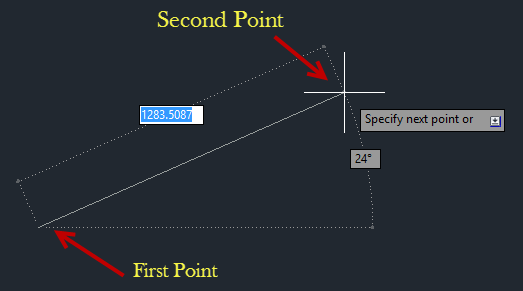
How do we make the mesh line tool show details like in the image I have here? Is it difficult to make something like in Inkscape or Autocad for Blender? I do lots of 3D line work usually so it would be great to have a basic line mesh tool like this. I want to click and snap to the grid or just start drawing a line from the first point and then type in a length. Having the angle show up would also be useful in some situations.
5 Comments
use single vertex and then extrude it as per your need and direction. Another way is to use Bezier utilities addon which is prepared based on inkscape.
Thank you for the idea. Do you think we could get the tool pallet from inkscape in Blender somehow? I'd love to be able to use something like that for 2D, 2.5D and 3D work.
It's sad we have to load the line tool from Add-ons. I tried updating the plugin but it's a bit too difficult for me.
I'm trying as well but I'm new to Blender.
I can see the Mesh: Snap_Utilities_Line is the tool I want and that the bug wasn't in this addon but actual in the core of Blender. Blender just isn't snapping properly when trying to close shapes and because of that the shapes aren't being welded closed. Or the snaps are working in a weird way and the welds aren't working properly. How can I figure out what the problem to get this fixed urgently?