
Simplifying moving to collection
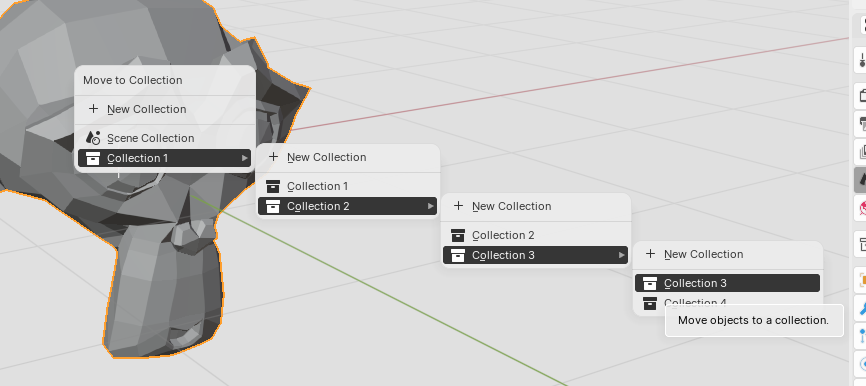
The menu in the viewport when moving something (M) to a collection that has other items in it seems convoluted. e.g. To move something into collection 3 I have to first open the "collection 3" node and then select "collection 3" under itself...
This is primarily an issue when you have hundreds of objects and it becomes too cumbersome to scroll through the outliner to find the correct collection where you want to place your object.
It should be possible to just click the tree node directly to move something in it.
9 Comments
Agreed. In a folder structure in your file browser, you don't have the folder itself in itself. That's just redundant.
You can just move it with the tower or set it up in the object data
What is "the tower"? What do you mean with "set it up in the object data"?
I'm not sure what you're calling "the tower", but regardless, what you showed is no replacement for the M popup menu. Using the object data requires me to exit my viewport (I often use it fullscreen), go to the object tab, open the collections panel, and then scroll my giant list of collections or search for the name, that's IF I remembered it. That's not a very user friendly workflow.
You can use Collection Manager native addon which replaces that with a way better interface and options, overriding the M hotkey. docs.blender.org/manual/en/3.3/addons/interface/collection_manager.html
That add-on is useless to me as it basically does what the Outliner does. With it, I cannot easily move an object I selected in the viewport to the collection I want. Current functionality of move (M) is totally fine, it just needs a small QoL change.
I know it's not obvious at first but all you have to do is press M to open the ui and click the cube icon of the target collection, just have bject(s) selected in advance.
Ah, that's interesting. Thanks for the tip, then! But I still think the default behaviour should be improved.