
Why is Blender's SRGB color display different from Maya and 3Dmax?
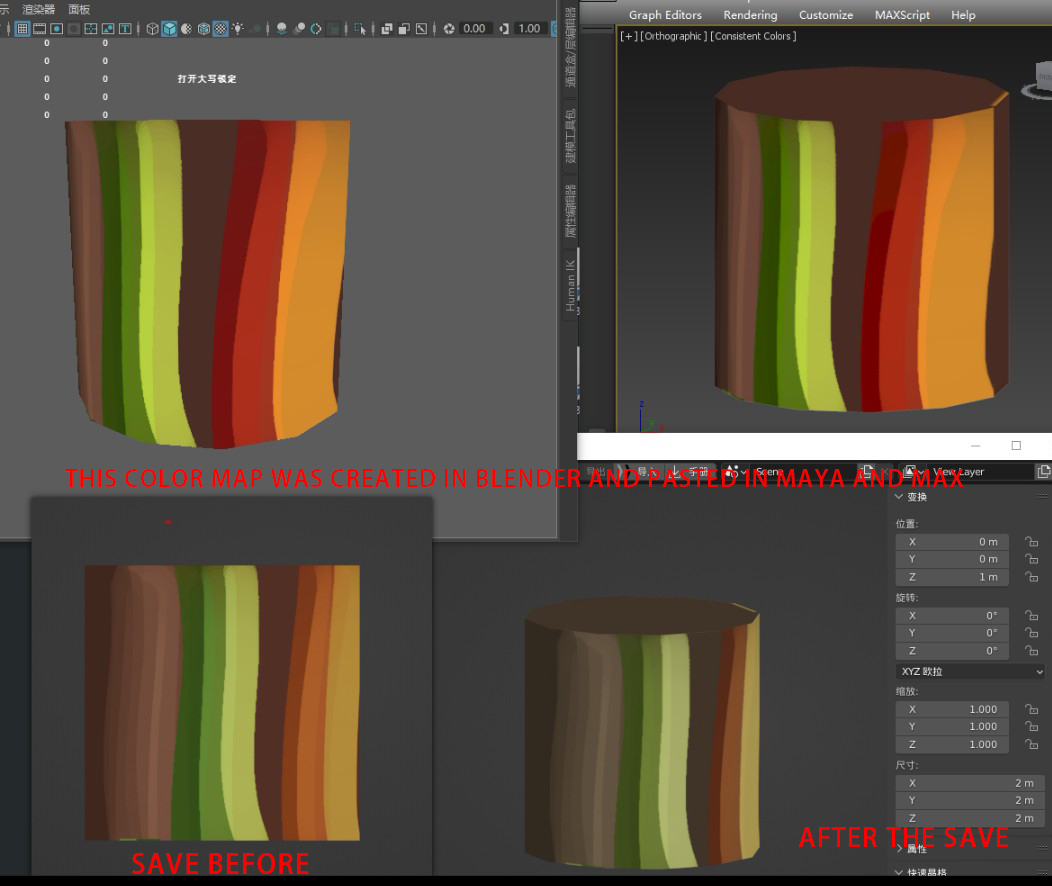
A lot of people were using Maya and Max before Blender, and a lot of people are still using them, and when Blender users are working with them, especially for texturing, Blender's color display is not consistent with Max and Maya, and that's really frustrating, It's all 3D software MAYA and Max that do the same thing, but Blender doesn't work well with the older software? This really caused a lot of trouble for those of us who use Blender, don't developers use their own software, this obviously huge problem, why hasn't it been solved??
The color on the left is the color before it was saved. When I saved the color in Blender, the color changed, I don't know why, and then I couldn't get it back. It's really weird, right? I put this color map in Max and Maya and they show the same color, and they show very different colors in Blender, which is really unacceptable,
3 Comments
RCS is not a tech support forum, you can get help on a site like blenderartists.org or stack exchange
As testure mentioned: this website isn't meant for providing help, it's for feature proposals.
That being said:
There are many things that can affect how your texture looks. Each of the viewports shading modes will display things differently and have several options that will impact that.
There can also be differences in the color management either in the scene, in the image data, or the image texture node itself in your shader.
And finally, the way you made your shader and how you light up your scene also has an impact.
My wild guess would be, you are trying to work in a 8bits color space but didn't set up Blender's viewport to do so. As such, Blender's viewport using the Filmic color management by default, you should try to change it to "standard" and see how it goes from there.
As to why it's different from Maya/3DS... Well.... Why not? It isn't surprising when two softwares made by the same company make efforts to make them work together, but other softwares don't have to do so. You can always change options to meet your needs anyway.
Other softwares like Maya and 3DS are often used with an external render engine and are not expected to hold the entire pipeline, unlike Blender. And I think for that reason, historically their viewports never did any attempt to really match things with the render output, starting from the way colors are displayed.
Blender seem to have taken a different approach where it tries to have a more global use and let you do as much of your production from start to finish. And in that context, since you are in the same viewport from start to finish, it makes sense to keep color displays closer to the final product. And since most people these days on Blender will do a Cycles/Eevee render on Blender with needs of postproduction, they hence need wider color data. 8bit depth will be used only on the final export.
Why is no one willing to solve such a serious problem ???????????