
Everything Searchable
We need more search capability. I feel like the ideas presented in this proposal will benefit new users and seasoned experts equally.
Everyone is lamenting the search functionality being taken away from the space bar and being replaced with the tool menu. I really like the tool menu and don't want to see it go away, but maybe we can have both and while we're at it why not make more things searchable or at least more easily searchable.
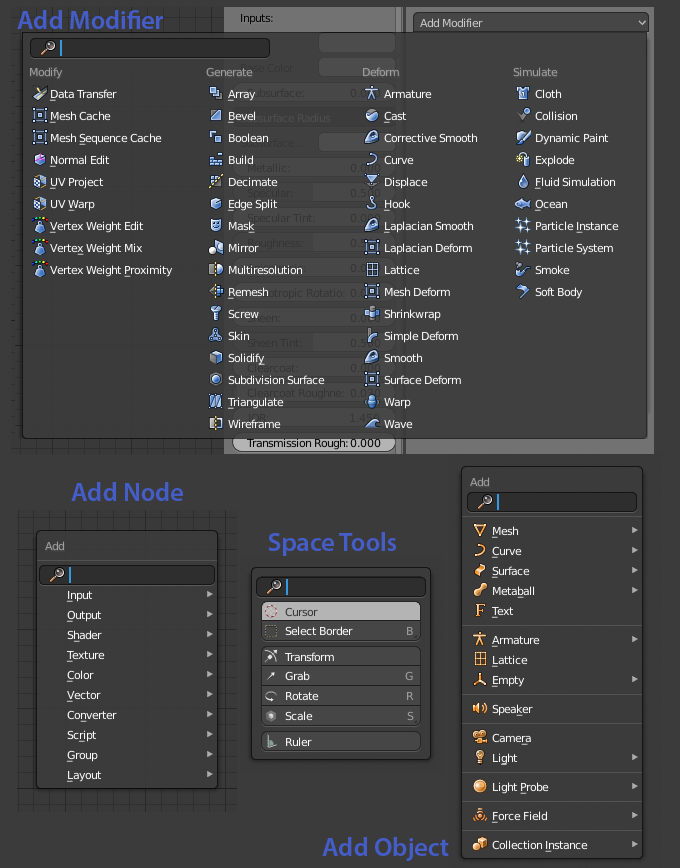
I propose that if you want to search, press the spacebar. The tool menu opens up as soon as the spacebar is pressed. When released, the cursor jumps into the search field so that typing will immediately enter text into the search field. If you continue to hold the space key, you can press another key for the tool shortcuts. So, hold the space and press G, you have the move tool active. Press and release, and then press G, you're searching for operators that start with "G". Instead of having to press the search button seperately.
Let's move this functionality to other menus that have a search item. Like in the various node editors. Normally you press Shift-A then have to select search and then start typing. Instead, we should press Shift-A and immediately be able to start typing. The search field is visible, focused and the cursor is ready for you to start typing.
Now what about other areas where search functionality would be helpful? Shift-A in the 3d View? Yes, please. How about searching for modifiers? Sign me up.
I think this will prove to speed up workflows greatly. Especially for those nodes/modifiers/operators that aren't used frequently, so you don't remember exactly where they are in the menus.
7 Comments
This could be a great idea,there is no need to be on Space bar it could stay on F3 or onthe topbar menu in the "Help" section.
I would suggest a search feature as the one from Mac OS software, look for it. It is normally located in Help (were inexperience people would look at) but then when you start typing and move the mouse oven, it will highlight the option on the menu where it is located.
imgur.com/imgl8nG
@l.torrecilla: Yes. I always liked that help search feature. That would be great to bring to blender and would really help new users in learning the interface.
The search is now in F3, but it would be nice to be able so search depending in what editor we are!
This would really help new users I think. Also, some of the places where you can already search are implemented in a way that is a little annoying compared to the search menu. For example, in the node editor, there is a link to search for nodes in the add node menu, but you can't just start typing the node name to filter. Animation nodes has a much better add node menu, which not only allows search just by typing, but the nodes are better organised, and you can search for add, multiply, etc. which are part of the math node. In the cycles node editor, you can't do this, which is annoying.
Anyway, I thoroughly support your proposal! Much easier to remember and understand than the current menus, which have shortcuts you can press directly instead of clicking on the menu item.
the search option in all Blender different sections is coolest thing and tons of time saver
I only need one place where to search for anything and the result to give me also a hint where in GUI can that be found. I remember once goin' nuts looking for Hook to Selected Object Bone ... (at least they added this menu in 2.80, finally)
Search for modifiers is so cool idea. Also, the spacebar menu concept is really great.