
Indent (and maybe color?) sub-panels in Geometry Nodes UI
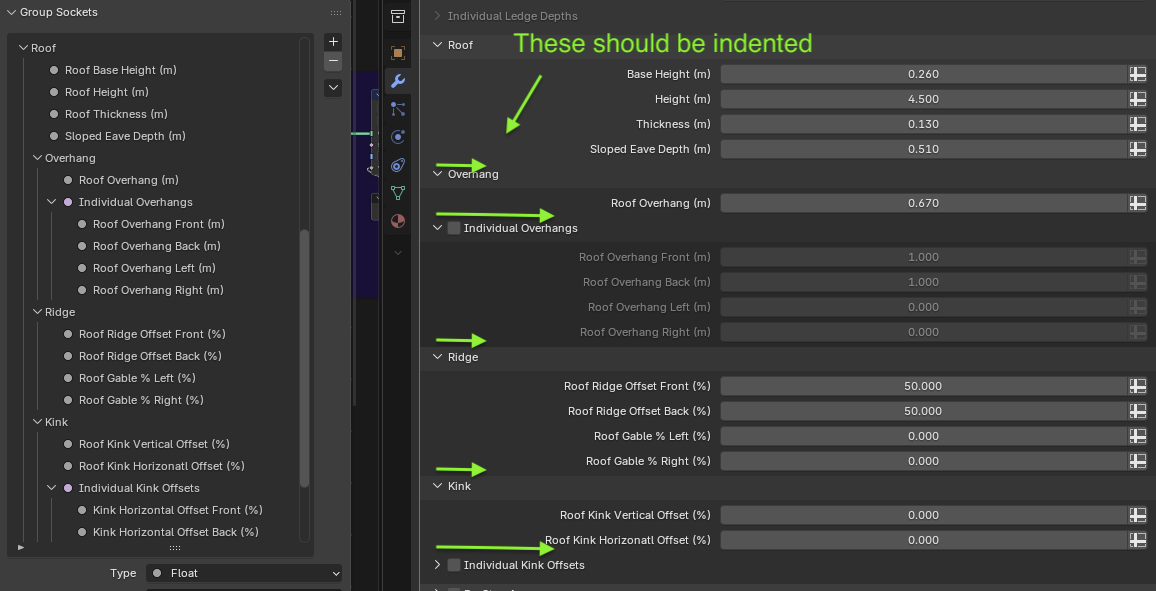
It is great that you can add sub-panels now to geometry nodes user interfaces. But each sub-panel text (and disclosure carrot) are drawn all the way to the left of the modifier stack. That makes it hard to know which panels are sub-panels and which are top-level panels.
In this first image, you can see the actual hierarchy on the left side, but on the right it is hard to know which of the panels are actually sub-panels.
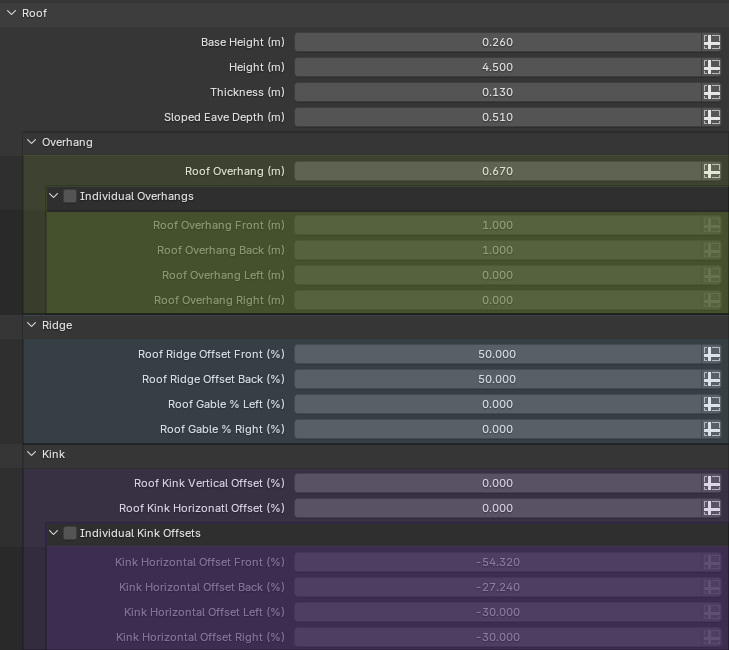
But even more useful would be the ability to set a custom color for each panel (similar how we can do that with a frame inside of a nodes network)
Here is a mockup of what I think would be an improvement (not literally this, but just something along these lines):
2 Comments
I don't think indenting will work well in practice. Horizontal space is a constant issue in Blender: labels get truncated all the time. Here you make it work in your mockup by extending the properties editor to a massive size. I doubt users will be happy having to do that anytime they want to use a nodegroup.
Perhaps, but there needs to be a way to visually identify which sub-panels are within which parent panels. Perhaps just the colors, or a more subtle indentation. Or maybe just some lines like you see in windows explorer?