
Allow user to move location and order of objects in a collection in the Outliner by dragging
Hello. I would like to request a feature that allows user to move a specific object's location/order just by dragging.
Thanks.
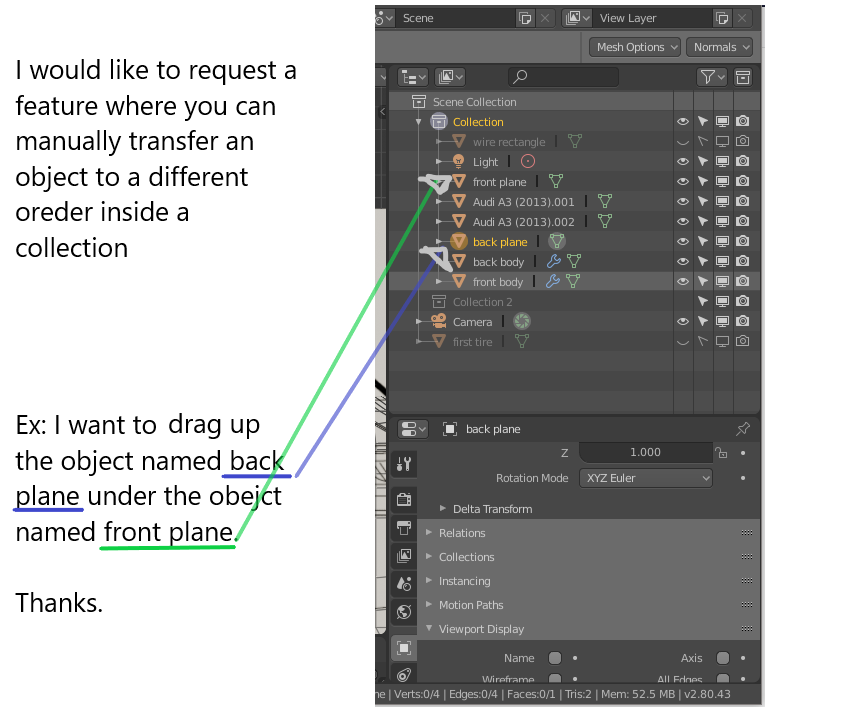
Hello. I would like to request a feature that allows user to move a specific object's location/order just by dragging.
Thanks.
9 Comments
I would also like to see alphabetical sorting.
absolutely, no disscussion here
this and 10,000 other improvements that need to be made to the outliner. i tell you I dread anytime I need to do anything more basic than select an object in the outliner.
* @testure * I guess that this is part of our contribution to blender developers. I know they are doing their job but this software is somewhat large scale. So this small things that we notice might be a good help for them to take it into consideration.
This is basic functionality for any scene organizing. I'm surprised that it isn't already implemented.
* @Chris Kohl * On Blender 2.81 and up, If I am not wrong, I believe this is already implemented.
* @johnpdelacruz26 * If it is, then mea culpa, however I can't find it. I've unchecked "Sort Alphabetically" from the filters and that does allow me to re-order collections (if the scene has multiple collections) but not any other objects like meshes or cameras. Tried it on 2.81, and a clean install of 2.82, and even Bforartists 2 alpha 0.9.0 and the only thing I can re-order is collections themselves.
* @Chris Kohl * Hey man checked blender 2.82 and you are right it is still not possible. Only possible to place an item when it is on a different collection.
Yes I think new user expect same thing. And actually I requested it in Blender dev forum.