
Pressing 0 Numpad looks thru any object's pov and not just cameras.
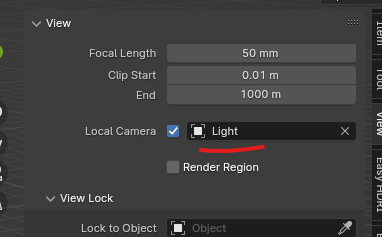
I like how fast I can get into camera's pov by pressing the 0 Numpad to adjust them thru its pov. Especially with 4.1's lock feature icon now. Though I still find it tedious to do the same setups for spotlights for the ability to aim at models. I'll have to enable it thru local camera and pick the light thru there. I think this setup can easily be simplified and streamlined when pressing the 0 Numpad to any objects to view it's pov instead. Especially it would shave a lot of time.
3 Comments
You mean Ctrl+0 to set an object as camera?
Oh! yhea thankyou so much! sorry if that was a known thing.
I think if ctrl+0 does it for any generic obj anyways, why must 0 being so specific for only camera? it could save the trouble from using too many shortcut keys.
Plus I like that if you press 0 again, it boots u out of local camera. ctrl+0 doesn't if pressed again. But that be one of those seamless quality of life I am nitpicking.
⎈ Ctrl Numpad 0 sets the active object as the scene's render camera and aligns the viewport's point of view on it, while Numpad 0 only aligns the viewport's point of view on whatever is your scene's render camera.