
Improve Weight Paint
I was searching for minutes from Internet how to understad the weight painted thing on Blender.
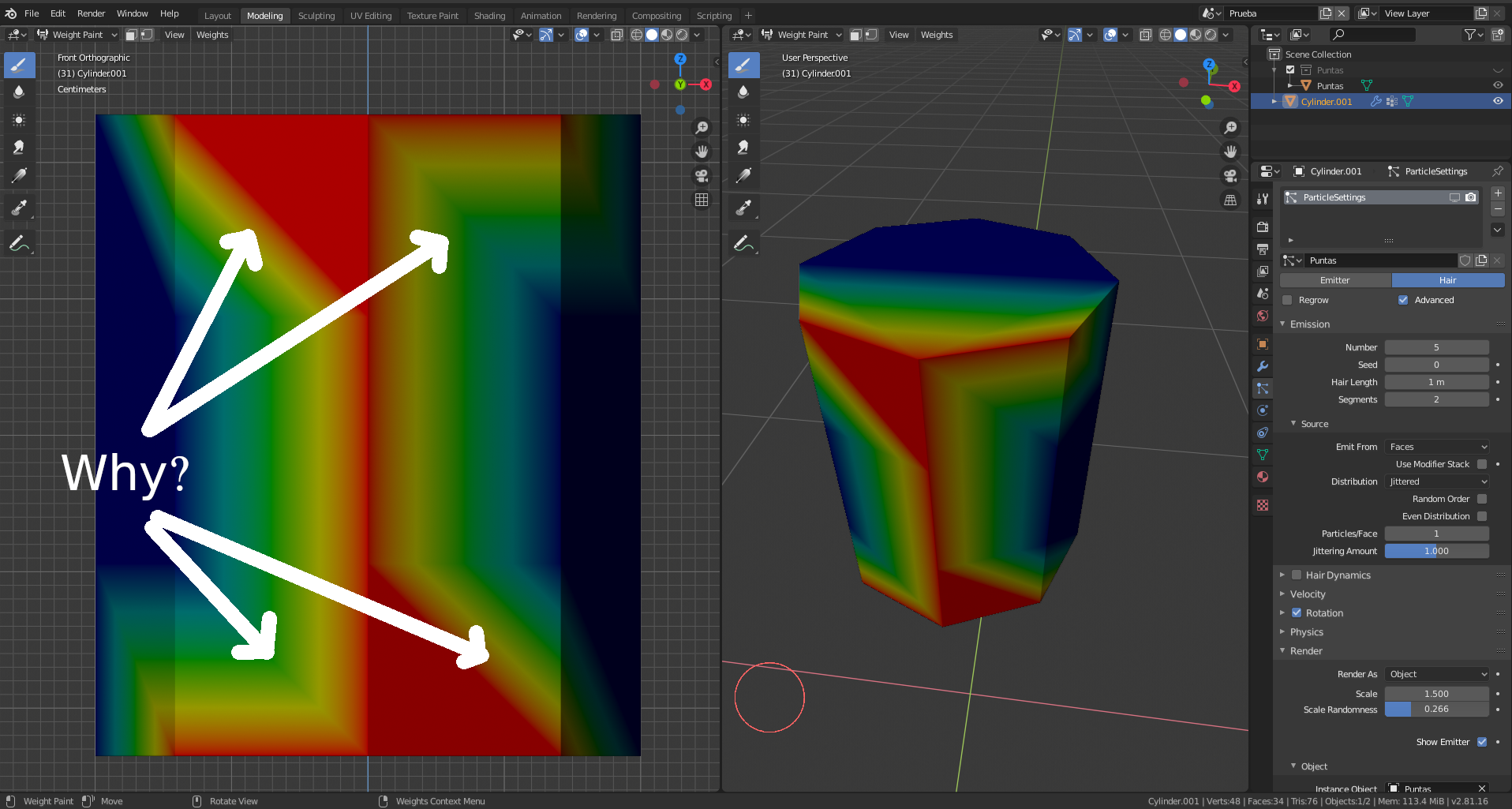
In my case it draw weird shapes. For example: How the weight paint determines that the vertex of the left is more painted than the vertex of the right on the upper side but not on the bottom side?
How to damn paint that equally on top and bottom?
The brush does not do a good job for that. I just put the brush on the middle of the face and nothing happens. It does not paint anything neigther unpaint.
Weight paint need a lot of improvement on Blender 2.81. I just look at video from 2.79 and it works much better.
I expect to paint like I paint a texture.
9 Comments
Ok, maybe I expressed bad myself. I don't have all the knowledge or truth. That is why I publish here.
If you think I must publish it as a bug that is OK. But please before giving me negative points give me the opportunity with comments.
Anyway, I don't understand all of you why just don't expect a better way of weight painting. There are no triangles on my mesh, that are quad faces. I don't know if the videocard or the software internally uses only triangles but if I am using quads on my work I expect saw the things as I am doing it (WYSIWYG).
What I expect is a painting like painting a texture, without inconsistent shapes.
I will be more specific: For example on the screenshot, top, there are a middle vertex with a weight of 1 (full painted). The right vertex is full painted too. The left vertex too, full painted. What I expect is something that gives me the idea or the impression of what I said above (middle, left and right vertex full painted).
How to achieve that? Instead of a completely red triangle on the left side I expect the same shape as the right on both. Because that avoids confusion of trying to figure out what vertex is more painted (if we have a weight less than full painted it becomes worst)
If you look a lots of painted vertex. I challenge you to note what are the weights of the vertex (or what are more painted). It is actually hard to figure out of that. So the actual displaying of the painted vertex are some confusing.
What I expect is some gradient from the vertex that expands to the other vertex. That does nothignt with triangles or shapes. The only thing that matters here is the weight of the vertex.
Some other guy just published here something like me. But I don't understand why I received a lot of reject. Specially because I am talking for something relevant. If you paint a lot of vertex you will get confused easily because sometimes the vertex are not painted at all and there are no way to figure out how much a vertex is painted exactly. It is some more as fuzzy than precise. But if we can improve it that will be helpful.
I need to paint sometimes to help me, and that becomes too confusing that I prefer to "assign" vertex to the group or use textures as reference instead of vertex weight.
But vertex weight is a useful thing if it can be managed like a texture.
I didn't put more images or examples because this site does not let me do that. I have no time to publish a video neither.
So sorry if I cannot complement my description with something more. But I am a busy person I have a family to take care and I have the exact money for that. I need to work a lot so I have really no more time for other things.
I am Linux developer for years and I know a lot about computer software so I know I am not doing a big mistake here.
What I don't understand is why you don't accept my suggestion although it is not the exact site for that. The bug tracking is for some more concrete things. I don't think that I only must publish it as a bug report.
It is a problem that needs more feedback. So I was expecting feedback here but instead of that I received a lot of negative karma.
The only thing that don't like me of that is if that will reduce my options here. I expect that don't limit me to read or search things here.
But really for now I expect feedback to take in account about this suggestion.
I know it is not a "feature" as is, but it is a suggestion to improve something.
And as I just said above, on Blender 2.79 it worked different. Look at this picture: pasteboard.co/INyBG3R.png
As you can see on the image it is working better on Blender 2.79b than actually on Blender 2.81. That is the same cylinder (8 sides) and painted in the same way.
* @anyeos * If you experienced one behavior in 2.7x and another in 2.8x, then that's absolutely a regression bug and should most certainly be reported on developer.blender.org (be sure to include an example .blend file).
As far as using textures to control vertex weights, that sounds like a proper feature request. I would encourage you to build that request into a more complete proposal that more clearly illustrates how you expect the feature to behave from a user perspective.
* @anyeos * It worked sam weay in 2.79 It it because OpenGL uses
barycentric interpolation
for vertex weight/color based on how quads endup triangulated.
It it because OpenGL uses
barycentric interpolation
for vertex weight/color based on how quads endup triangulated.
 Unity does this too (i don't know if other DCC does that different or not)

Yes, i guess it possibly could be improved by supporting Quadrilateral Interpolation or something like that for quads for better visualisation.
You get negative feedback because you posted question instead of proposal.
* @Jason van Gumster * thanks you a lot. Now I am more clear that what I must put here as a feature and there as a bug report. When I have the time I will do.
I have no idea that a major version change is considered a regression. I just thinked that 2.80 is a completely new launch.
* @Pawel Piotrowski * nice to know that.
But about the negative feedback was some heavy anyway. I guess if there are people already knowing more about the inside of Blender they can emit a better judgement about the intentions of somebody. I think they judged too fast!
Everything is in the end triangle, so as and those 2 quads end up differently triangulated so interpolation worked out in different way.
This reads more like a support request or perhaps a bug report than a feature proposal. Simply saying "make it better" isn't sufficient. Specifically what is the improvement you would like to see?
* @Jason van Gumster * that is exactly what I am saying right now. I just exposed all the information on this paragraph:
"Weight paint need a lot of improvement on Blender 2.81. I just look at video from 2.79 and it works much better.
I expect to paint like I paint a texture."
But I am not pretending to be arrogant. I just thinked that is the manner of expressing here. I just readed some other people talking like that and I assumed that was acceptable. Maybe I was confused about that. I don't know now but it is ok. I have no problem of including information as needed. Just that on some other sites wants the opossite: less information.
Weight paint paints vertexes weights, and therefore the detail will be defined by mesh density. This is how it works in all 3D software.
I worked the same in 2.79, you were probably just watching a video where they had a mesh with a lot more geometry.