
BIN ORGANISATION IN SEQUENCER
Hi everyone, i have a proposal for the blender sequencer, i’m currently a tv editor (avid media composer, final cut, premiere) which would be more than happy to use blender for serious editing. I know the purpose of the video editor isn’t to become a professional tool for editors but more a helper for 3d-focused job, but there’s already a lot of good idea (like metastrips, infinite tracks for audio OR video…) in it which are NOT in other commercial software, i think it’s a shame to be limited to simple edit because of lack of functions.
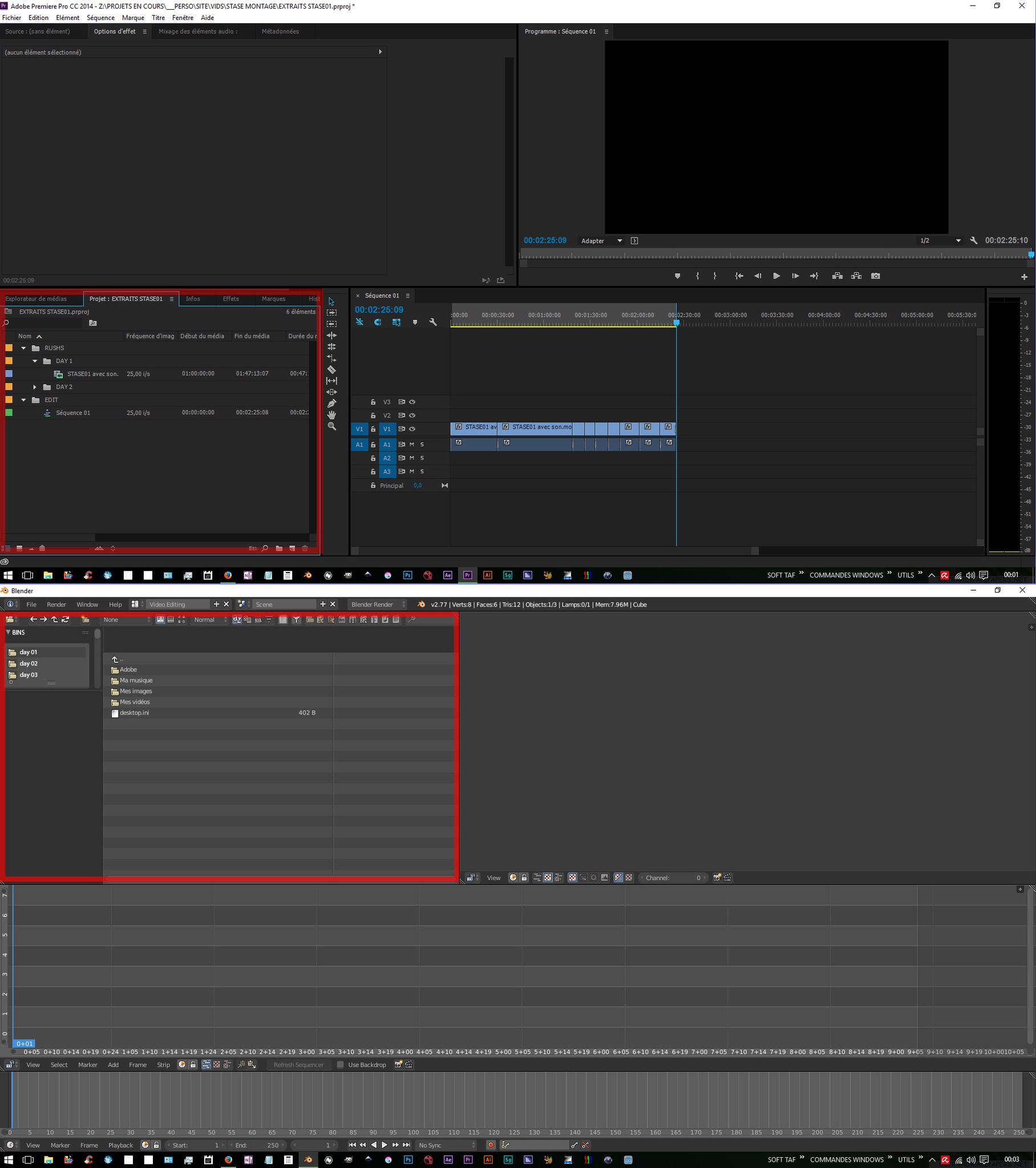
Blender really needs to add a rush organisation system, wich is independant from the actual location of the file, and permit to class the files in “bin” (or blender scene) in order to work with a lot of rush, like on a documentary or else. In this case, you often doesn't want to mess with the source files (like rename or move them) in case there's a conform or a colour grading pass after the edit. Premiere by example (which works same way as blender, real time decoding and editing, not like avid, which makes his own video files from your rushs before editing them (mxf format) )
, in premiere when you put a video i the software, it goes in a "pool" which can be organised with folders, rename... without touching the source file. The video which appears is just a link to the original file. I think if blender could have such a file organisation system, it could be a great editing tool (obviously not for a 14 tracks edit on a laptop, but that's another problem ;) )
what do you think ? is there other editors which are thrilled to use blender for real editing ? tell me if that sounds like a good idea to you !
3 Comments
Love the idea, though I think it could probably be done by modifying outliner such that there is a section for strips & images combined, and groups such as what you indicate, could be shown here perhaps.
The bin idea in general would have to consider how users import footage, ie drag and drop into the outliner as opposed to into the timeline itself? Would it auto force single user (F) to keep datablocks if not immediately used in a sequence, so the datablock isn't lost later? I'm not sure how it would be implemented in blender in such a way the UI team would approve/be consistent with the rest of blender, but I like the idea.
The Outliner might be one way to go, but the File Browser already has a lot of the necessary functionality (drag/drop, large thumbnails, ability to navigate internal structure of .blend files, etc.) In fact, when editing, I often change the Graph Editor in the default VSE layout to a File Browser and drag my clips into the timeline.
The only thing missing is a virtualized clip space (the 'bin' concept) that references the path to source footage and start/end times in the footage for the specific clip.
In fact, we may already have most of what we need. Movie Clips (as used in the motion tracker) are already datablocks with
frame_startandframe_durationattributes. Using the File Browser on your working .blend file, you should be able to navigate to the Movie Clips datablocks and treat that as a single bin.That's a pretty good starting place for fleshing out this feature, I'd say.
hey good to know ! yeah could be a starting point, and bin files, like in avid media composer, permits to share some organisation with other users ! but the main problem in this is a blend files doesn't open in a file browser windows, unless you're appening or linking ... (in main 2.77 at least) and this method lacks a way to dispatch the files in the different blend/bin files, the only way is to make these bins one by one, project by project... but that's good to hear there's a way to implement this feature with existing functions !