
Make the UV editor default to normalized coordinates
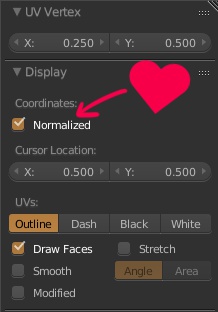
Since I regularly use multiple materials, each with several textures and sometimes textures at different resolutions, I find it very hard to work in the default texture resolution dependent coordinates of Blender's UV editor. Basically as soon as I open the UV editor, I enable normalized coordinates and then I can work much faster as I don't have to care about the resolution of the current image.
On top of this, every other modelling program I have used, every game engine and every shader language only cares about normalized UV coordinates, so I would love to see the UV editor use normalized coordinates by default in Blender too.
3 Comments
There are so many requests for "make it a default" and then "make it a preference" about a whole range of settings. And I think that the preference window is full enough, no feel the need to put there checks that you already have in the UI. Since this kind of things can be made default saving the startup file, i wonder if it's time to have a different approach. For example right-clicking on a checkbox/menu, along with options like "edit source" "copy data path" etc, there could be a "save in startup file" or "make this default" option. As to say that the whole UI can be seen and used as a preference window.
At the very least it could be an option in the User Preferences, that way it's up the user whether or not they want it as default.
I strongly think the default should be changed, although having an option for it in the user prefs would be preferable to the current situation where it seems to be impossible to save.
The way it's set up currently is that it can't be saved in the default scene unless you have a uv editor panel open. If the uv editor is closed and another one created for some reason, then all the settings revert back to default.