
Implimenting A Node Graph for Texture Paint
With the Blender Internal (BI) renderer planned to be replaced with a Physically Based Render (PBR) engine, we lose a bit of functionality for texturing objects in Blender, the BI engine has a basic but functional layer system. With cycles we have a node based system that is set up for the creation of materials, not the creation of texture maps, and while you can create textures using the Cycles node graph it does not have all the tools and filters we have come to expect from using other programs. Though, this should be seen as an opportunity for further development.
As Blender continues to embrace a node-based work flow throughout the entire program, texturing should do the same. Other dedicated texturing programs, Mari and Substance Painter, have already started using node graphs along side their layers system. With this increasing trend towards the use of node graphs within the animation and VFX industries, using a dedicated node graph for texture mode in Blender is preferable to recreating a layer based system. This has the advantage of enforcing a consistent work flow within Blender (node-graphs), which means that new and old users who might fiddle with Cycles shader nodes or the Compositor nodes, should feel right at home within the Texture node graph.
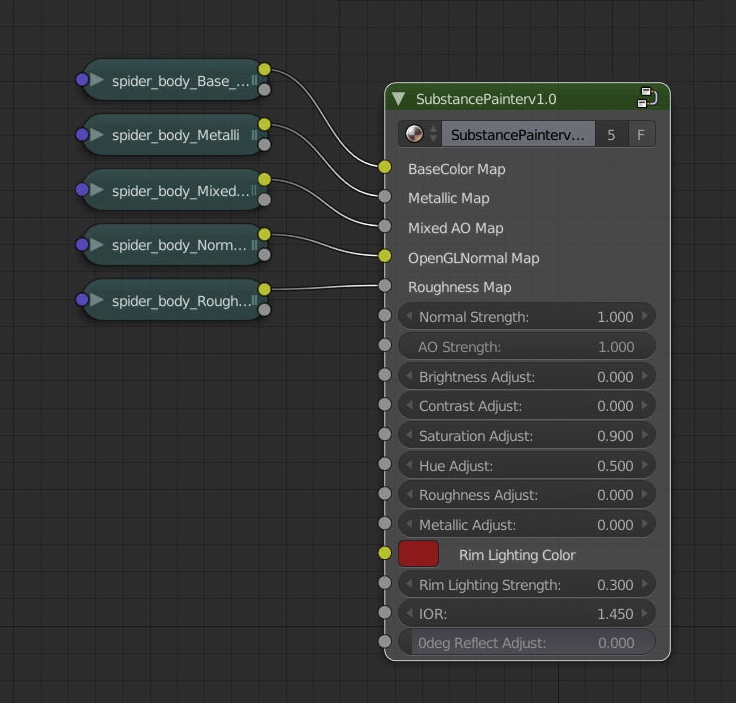
But, how should these different node graphs interact? We’ll need some way of visualising a Cycles shader node group within the texturing node graph so we can connect our various textures maps to the shader. The same is true with the cycles node graph, we need to be able to see the various final outputs from the texture nodes groups in Cycles. Thankfully Blender has already provided us with the start of a solution to this: node groups and image texture nodes.
In the texture paint node graph, a node group or shader input like this would allow the artist to quickly plug in the final output of their textures into the shader without having to go into Cycles Materials. Whether or not the artist can adjust such things like ‘normal strength’ or ‘AO strength’ while still in Texture Mode, might come down to how the shader network is created.
There are many advantages to such a system: The artist can easily cycle through created materials in the materials Tab, to view the textures on different materials. In an ideal situation the textures would automatically connect to their corresponding outputs of the shader node group; but, this might not be feasible and might lead to the texturing system being less flexible. The texture node group would be quite independent from the Cycles node group. The artist would not need to fiddle in the Cycles in order to create their textures. As a result, it becomes easier to implement standard materials across a production, and easily test work in progress texture maps with cycles materials. As a node graph, the system would be inherently non-destructive. If a texture is created and passed through, say, a blur node, the result is a blurred image. But the original image has not been altered in any way. It might be possible to reuse many of the nodes from the Compositor node graph, and some from the Cycles node graph in order to create the Texture node graph. Admittedly, this is just a guess and is probably wrong.
###Optional extra? PBR has become the new standard for video games, which is why Substance Painter is such a popular tool, its whole texturing work flow is centred around creating texture maps for PBR shaders. Blender does offer the ability to create PBR shaders, and there are many tutorials out there on how to create them. For example, there is the SP2BLEND shader group by BlenderBrit on the Blender Market, which offers a Roughness/Metallic work flow so that users of Substance Painter can use their textures in the Cycles render engine.
As Cycles continues to develop, pre-installed PBR materials/shaders that offer either Specular/Gloss and Metallic/Roughness need to be quickly and easily accessible, either as a shader in Cycles or a default Material in the Materials Tabs. Having such an ability would make it easier for artists that work with industry standard programs like Substance Painter or Mari to view and render textures, or wish to create textures in Blender for game engines that use PBR.
###Future Development – speculation In the future, if such a system was developed for texturing in Blender, it might be possible to see the usage of GIMP’s GEGL for nodes in the compositor and the texture node graphs. This could result in a speed boost while using the various node graphs due to GEGL using OpenCL, and OpenCL running on a GPU. This could also lead to the ability to easily transfer compositor and texture node graphs between Blender and Gimp. As stated by Jehan, lead developer for the open film, ZeMamrot , (GIMP 2.9.4 and our vision for GIMP future) ‘I want to imagine a future where most big graphics program integrates GEGL, where Blender for instance would have GEGL as the new implementation of nodes, with image processing graphs which can be exchanged between programs...’ .
Thank you for taking the time to read this submission.
1 Comment
That would be really awesome! If I had more uppety points to spens I would waste them all here!