
Render Nodes
MOTIVATION & THE CURRENT SYSTEM
The current way of setting up multiple render layers is not great. It has limitations that I feel are important and that, if solved, would make the rendering much more powerful than it is currently. A couple of the main issues I find limiting:
-
The set up is unintuitive and cumbersome due to the need of actually going into all of the viewlayers in order to properly set them. “Use for rendering”, “Render single layer” checkboxes not being globally available is particularly annoying.
-
There is no general override system at render time per layer, which the actual library overrides is not designed to tackle, if I am correct. (maybe the still undeveloped dynamic overrides? I'm unsure about that). Material overrides are set per viewlayer, which is very limiting.
-
Some render settings are global, and the user needs to use multiple addons to get basic render funcionalities (e.g. different frame ranges per viewlayer)
-
Properties panel and compositor are inconsistent in their possibilities. Channel renaming, custom outputs per viewLayer are two that come to mind.
THE NODE SYSTEM APPROACH
With the current push for making nodes a backbone of Blender, I think it is a good idea to make the render/layer setup a nodal system as well. To me, it would have clear benefits:
-
Flexible, job-oriented workflow : from a gral settings node tree, you could branch off multiple variations (e.g. Custom frame ranges, motion blur specification, caustics settings, sampling settings, passes, cameras, etc), that go into different “jobs”, instead of having to specify all render settings per viewlayer in isolation.
-
Shareability : in a production environment, there are huge benefits in having easily accessible presets that are also flexible enough to accomodate per shot needs.
-
Consistency : This could resolve the duplicity/inconsistencies of properties panel vs compositor, and unify the workflow. All of it would be done inside a renderNodes tab within the compositor editor. The current displaying system in the properties panel could stay mainly as it is displayed right now, so users with basic needs don't have to create complicated node trees. But the settings would be the reflection of a node system.
-
Nodal approach : It goes well with the everything nodes project, and I think it shares the spirit of the deveolping GN system
-
Baking possibilities : Slightly off-topic, but a node tree approach could benefit the baking system, to set up different bakes at once, an then process them as a batch.
-
Override all the way down : In the proposal, the nodes are conceived as a flow of properties, so those far along the node tree would override the previous ones. If you were to disable the visibility of all items of a viewlayer with one node at some point in the tree, and then enable just a bunch of them after that, it would work as if you go into the viewlayer and disable rendering of all items but those.
DATA FLOW EXAMPLES
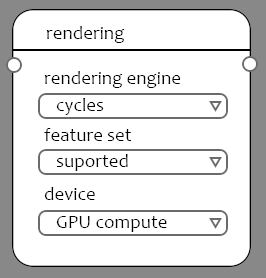
figures a & b : An example of two types of data flows. "A" would be the simplest, a straightforward render of viewlayers with the same settings, and "B" would be a little more complex, showing a couple of overrides done later in the nodetree, that give the user flexibility to define a couple of base settings and then override them if needed in the nodeTree.


figure 1 : here there is an example of a more complex setup. Note: Here is also hinted overriding materials per object at render time, which it is another task altogether, but even in the simple example, the ability of just per-job (whole viewlayer) material override, combined with an overridable selection of visibility properties within a nodetree system would be a huge gain.


figure 1C
: note the
compositor
node (within the pink frame). In this proposal, all the compositing would be separated from the actual render nodes, in the compositing tab. There should be a way to switch between modes easily.

Figure 3
: Just for showing the benefit of having a globally available job-oriented render setup would be great IMO

26 Comments
Also - include in/out node to connect to Video Editor and you have a single unified graphic output pipeline => Very powerful!!
YES! This is a solid solution for several problems that currently feel sloppy in Blender.
A few ideas:
* @jon * I think both 1 and 2 suggestions are good. The thing is, it is a very big proposal, and it is just a very gral overview to see what could be. It lacks tons of details, and all suggestions are welcomed. Regarding point n3, last figure in the post shows how I imagined it could be exposed in the properties, and it would allow to select certain jobs.
This is added funcitonality to the compositor, I could get behind this. You can already extract scene and view layer data, but also working on collection, view and scene data overrides from within the compositor would be very very very useful.
Although there is some real potential in the concept of having a nodal based pipeline, There is a lot of un-clarity in the proposal. You need to be able to start blender and press f-12 to render. How should we keep the simplicity of blender and be able to use a nodal based pipeline.
I would rather see this more structured in pipeline components. It is not clear where the boundaries of this tree would be. How would you debug if something isn't working as expected.
For material overrides we already have a design for render overrides we already have a solution in place. Adding an option in two places is confusing for users and would make it harder to debug for both users and developers. If the current system doesn't provide a feature, than see how we could improve that feature.
It is unclear how this solution would relate to a scene and core principles in Blender. The main idea behind this request is that the current implementation
unintuitive and cumbersome, but don't see that that is solved with this design. It seems that it only adds more work and more unclarity and even more disconnection with Blender. We should make sure that that isn't the case.This feels a bit as a solution for everything proposal. I would suggest to start with a single problem (use case) and engineer a solution around that. What I would suggest is to focus on scene input and file output first.
I am totally not against having a nodal based pipeline and would like to invest to make this proposal better.
* @Jeroen Bakker * thanks for the input, Jeroen.
I fully agree, it is a very big proposal, and it is laid out in a way that seems like an umbrella solution. Thing is, I did wanted to throw it out as a basic (i.e. general) idea before putting more effort in concrete design-like cases.
Yes, absolutely. I have a couple of ideas about how I imagine it could work, although not explained here, because I thought it was getting into too much effort/detail without knowing how the general idea would be perceived.
I think maybe it was a bit unfair on my part, sorry about that. I do think now it is cumbersome, but the main idea behind it was about the flexibility and the power it would bring. But I also think it can be made in a way that it is intuitive and simpler than it is now.
Thing is, I couldn't find a design for dynamic overrides, I looked for them but maybe I missed them. I agree in that it shouldn't be duplicated systems, but also, I think one of the biggest limitations when it comes to render different layers/passes in blender is the unability to override materials per object (collection, mesh, I'm not sure where should be the limit), and being forced to override entire viewlayers. I feel that, whatever the dynamic overrides plan is, it should be available to apply them at render time. And, in a nodal system, it is a property that should be made visually clear. But again...I couldn't get a look to the override plans, so maybe I'm just...preaching to the choir(is that the correct phrase?).
I am totally on board in proposing a couple of more concrete, basic cases, and see how it would fit into the general blender design. Although I am not sure where to post it. Here? on devtalk? I am not a developer, that's why it is here (and in this kind of nebulous- hey look at this, it would be cool to have this! state)
The issue with dynamic overrides is that it requires to become a part of the dependecy graph. This solution would influence the dependancy graph but in a way that it might become unmanageable. So yes it might be very visible to the user, but might be unmanageable and would lead to many issues for both developers and users.
If we want to move forward it should have a tangeable design. Otherwise it would become more or less: look at this nice idea that I created and it would never get any further than an idea.
"Any intelligent fool can make things bigger and more complex... It takes a touch of genius --- and a lot of courage to move in the opposite direction."
I rather be in the part of courage and genius :-)
* @Jeroen Bakker * Well...being a dumb coward, I only can commit to give it a try! :) (Just kidding, I get your point, I completely agree, and will give it a shot, I think it's worth it)
* @Jeroen Bakker * Easy, you press f12 and Blender gets the render settings from the active node if it's available, and if not it reverts to the settings in the properties panel.
* @3d -illusions.co.uk * You could also just have a use nodes checkbox like we see in every node editor, including the compositor.
* @zorro.weaver * or perhaps ctrl shift f12 to use the node tree instead of the properties panel.
Personally, I'd like to see the properties panel scrapped in favour of nodes, or if not scrapped, have them be a mirror of each other, ie changing a value in the property panel also changes the node. That way you could choose to work in the way that suits you best, property panel or nodes.
Hey, first, big shout-out to you @txo for making such a detailed proposal and putting all the work in to it, thank you.
Solaris Houdini makes big waves in the industry right now. Houdini implemented that first bypessing Katana. I think the same will happen with Blender if we see an implementation like that. No doubt it would be very powerful.
The flexibility with nodes is undeniable and if you want to keep it simple, like someone in the comments pointed out, with just pressing F12 to see a render, it should be still accessable. Meaning that it is almost like the shader network in Blender. You can make changes of the shader in the menu like some color or roughness changes or dig deeper in the shading node network to build a complex custom shader. I think the same would work in that case for lighting and rendering.
There is actually an open source software out there which is actually doing this. It is used and developed by a VFX house (ImageEngine) and is called Gaffer. As far as I know it is even equipped with Cycles by default as a renderer. Here is the link for more information about it:
gafferhq.org/index.html
This is a well-proven system by Katana and Houdini Solaris, enabling Blender to become quite a powerhouse. I disagree, however, with only one point of your design - the View layer node is always the start of some object collection and then building settings and other render attributes etc. I think it will be much better to have the View Layer at the END before the JobList! it is much easier to define what you need - all your collections, objects, lights, and cameras, then render attributes like range, output type and file path, resolution, fps, world settings, then Render settings, then render Passes or AOVs and finally all this can be set to a Viewing layer, which can be hooked to a JobList... Otherwise 2 hands up from me!
Yes, having render dimensions directly stored in camera, and overwritable using node is a MUST HAVE.
When will the Blender development team pay attention to this proposal? I am really looking forward to the launch of this feature, which can greatly improve my rendering efficiency.
I wonder if there's a clean way to expand this into working for multi-shot setups? The jobs list could feed into a shot list, and there could be a shot override node that switches between two graphs depending on the shot. Along with object specific overrides like moving lights around, that would approach being competitive even with dedicated rendering tools like Solaris.
I like it! I really need this feature for my workflow
I actually made a 30 min video on this very topic a while ago. I built up a full example of it's usage:
devtalk.blender.org/t/i-love-blender-so-ive-spent-a-bit-of-time-designing-a-better-ui-workflow-what-do-you-think/9693
It would certainly make Blender a LOT more powerful, and also more intuitive for complex requirements.
YES!!!
Guerilla render have a similar approach for render layers which is quite powerful but not as developed as this. I would love to have this level of control directly in Blender!
You should create a topic on devtalk.blender.org to get opinions directly from the devs!
don't forget the scene node, and compositor node. Need to be able to render all scenes and select which gets which compositor.
* @3d-illusions. co. uk * yes it is a basic need of this proposal. It is already shown in the design images, as your can see in figures a or b.
How you add multiple images in proposal.
* @mrajendra2150 *
* @mrajendra2150 * Could you elaborate? At what point would you add images ? by images you mean individual renders or something else? Images (as in renders) are generated per "job", specified in an output-type node that would be basically a render task list, like a batch (figure 3). Each of those jobs would have different parameters defined by the node branches that connect to it directly. So you can have some common settings at the beginning and then override certain attributes(e.g. frame range, sampling, etc) in some of those jobs, and then specify what gets render through a checkbox interface widget (or something else, the core ideas is what I think it's interesting). A common case could be a char/bg job, where bg could be one single frame and have a different sampling settings, probably more optimized than the character. If you take that concept to more specific type of render layers, you can get an idea of how this could be really useful (in part, I think there are more benefits than just this one)
* @juan gargallo * I think he meant - how do you add more than one image to a Blender Community proposal description (As at the top of this one)
* @ammusionist * Ah, you're right, seems like it!
As * zorro.weaver * showed. You have to upload them somewhere else (eg. imgur) and link them in markdown format, here's a link to see the whole cheatsheet