
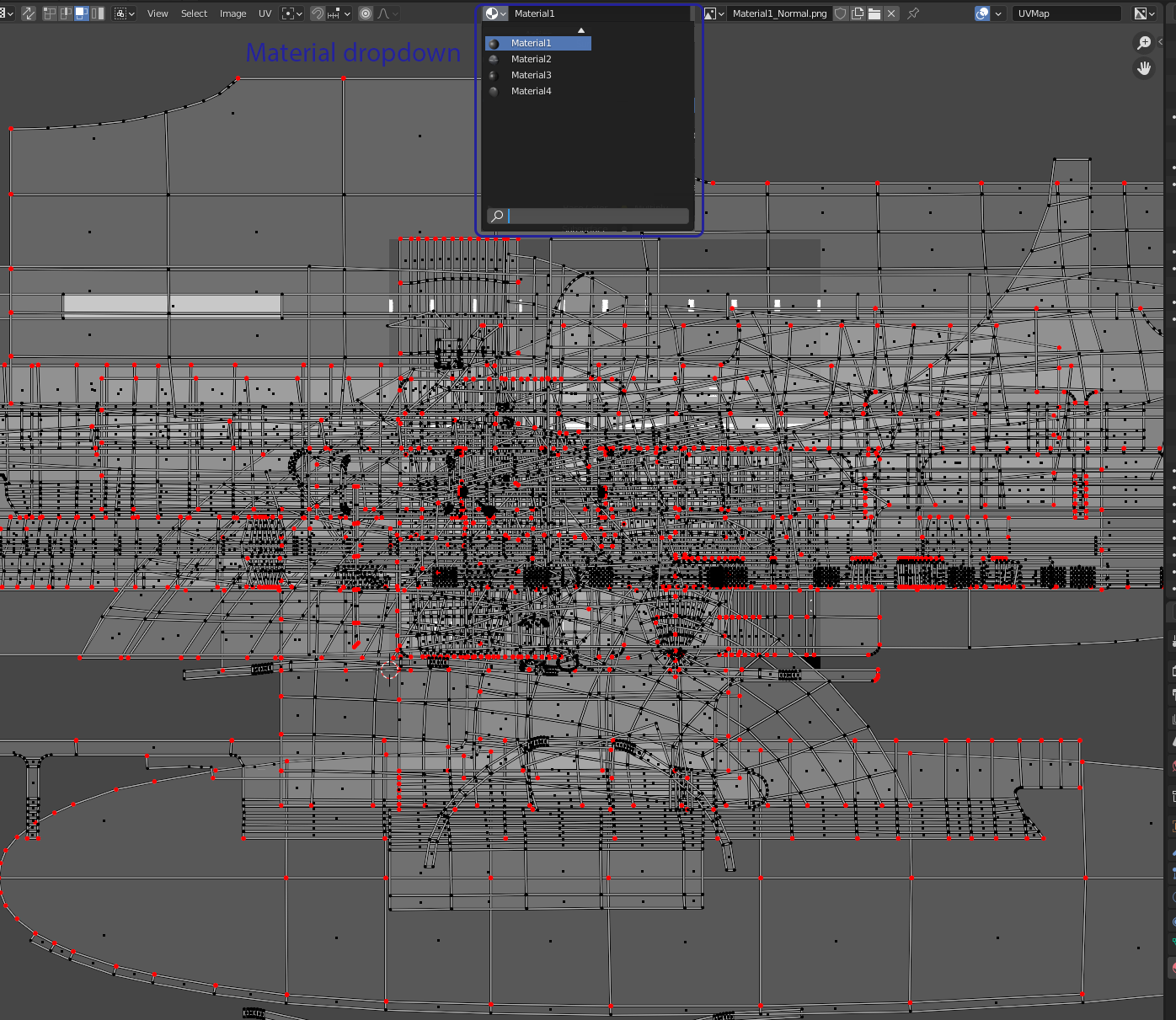
Material dropdown for the UV editor
I would like to see a material dropdown menu inside the UV editor which would show you all active materials on the curreently selected object. This menu allows you to select one material at a time and when you select one Blender automatically hides the faces belonging to other IDs and it automatically selects one of the textures used in the material to show in the background.
Having this kind of functionality would make it a lot easier to work with complex meshes that use a lot of different tiling materials (like game-art) as it would simplify the process of finding the correct texture and minimize the clutter of UV islands for other irrelevant (at the time) materials. For example if I'm unwrapping a UV island to a trim texture I don't need or want to see all the other UV islands that I don't care about at that point (see the picture for an example).
The texture that's automatically shown in the background would need to be set up somewhere, this could possibly be done inside the Shader Editor. You would possibly just have to tick an option inside the Image Texture node to load this in as the default in the UV editor.
The image dropdown would still remain and retain it's functionality, however if you do select a material it would only show the ones relevant to that material. So going back to the image example if you select Material1 the texture dropdown would only show the textures referenced within that maaterial specifically (like Material1_basecolor, Material1_normal, Material1_roughness, Material1_metallic, etc.) and filter out all others.
Obviously I know you can hide the UV islands you're not interested in and manually select the texture in the dropdown menu. However it doesn't take many texture sets until the dropdown gets very crowded and the same goes for the islands, it just easily gets a bit out of hand and becomes more difficult to work with than it needs to. While the current workflow is okay it just leaves a bit to be desired imo and having used other 3d applications there are better solutions available.
3 Comments
I would slightly alter Your proposal and not have active material, but rater have "filter" that have ability to filter out unwanted UV with those materials.
While having only one material is common i can imagine situation when you would like to have two materials (eg. mat variations) and you still will have functionality to solo-out material with eg. ctrl-click
"when you select one Blender automatically hides the faces belonging to other IDs and it automatically selects one of the textures used in the material to show in the background."
Rather than this would be better have some "outliner like" list (somewhere it N panel) with selected faces materials and visibility icons so you can manage which materials UV's to show and which not. Also it could have some "active" material state to show texture from this material.
Problem with this system is - you not always want to show texture belonging to material... sometimes oyu need to do UV's based on some mask or any else texture same for whole mesh. With this system you will need to put this texture inside of each material.... Or have some switcher which will switch the way it work globally.
* @IIIFGIII * Yeah, that's another possibility. I think if it was a big list where you had to turn visibility on/off for every material every time you wanted to hide or reveal them it'd just result in a lot more clicks than necessary.
Besides with my suggested feature implemented you'd still be able to show the UVs for all materials at the same time and have the same picture in the background behind all of them. This feature request doesn't take any functionality away from the UI, it only expands it in a way that would make it a bit easier to work with. If you like the current workflow you'd be able to keep on working in the same manner you always have, you just wouldn't need to touch the suggested material dropdown menu.