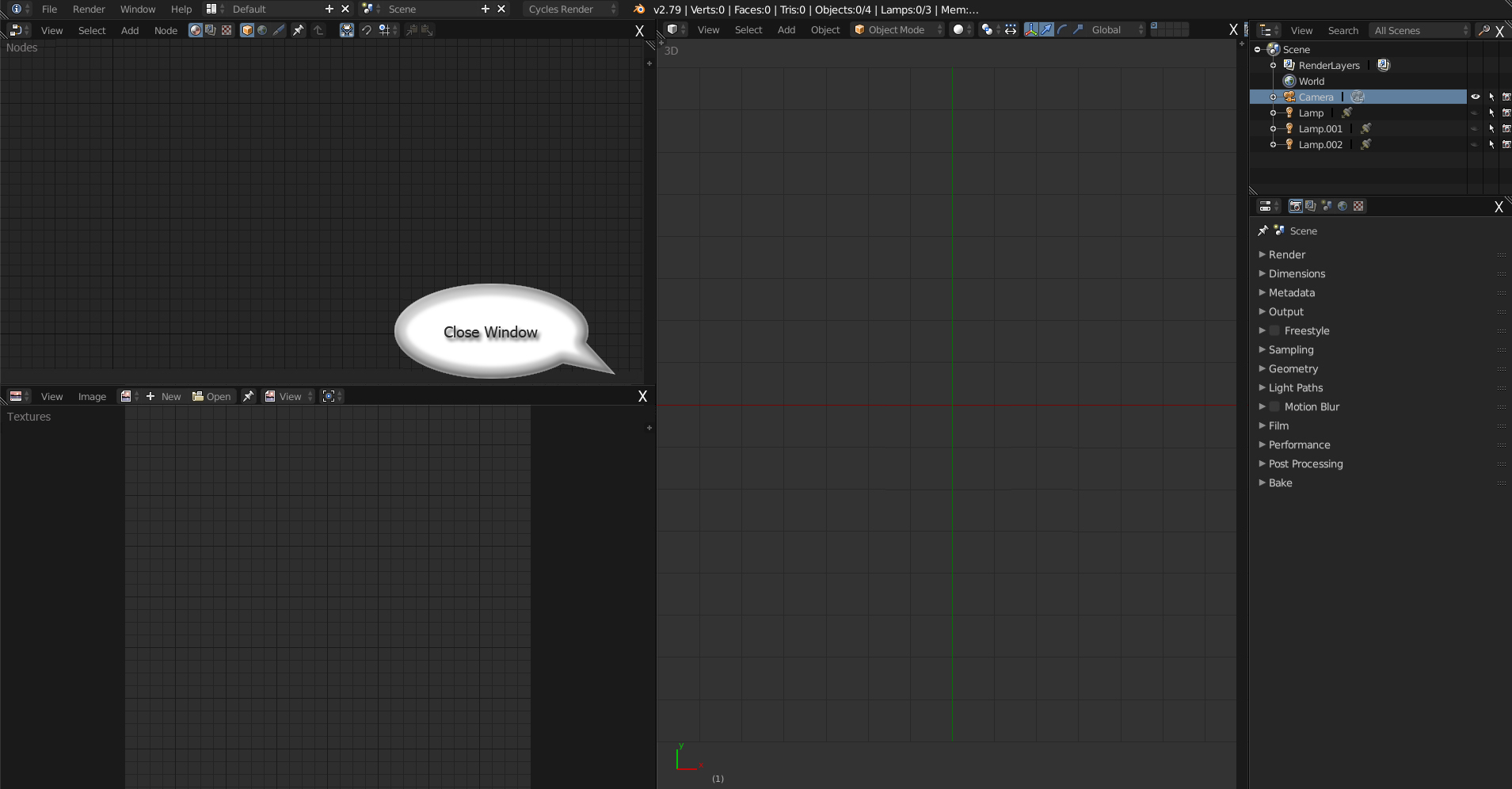
Wouldn't it be nice if one could close a window by clicking on the 'x'...?
33.3%
Development Status:
Open
Upvote3Downvote6
f
fractionalist
26 Feb 2018
11 Comments
C
ChameleonScales
What would happen if a window was aligned with 2 or more other windows ?
Which surrounding window would replace it ?
2
f
fractionalistAuthor
@Caetano Veyssières:
You'd open another window - drag it into that space -
a
artturi85
I would maybe replace it with "second click" behavior. Your second click will determine which editor will increase their size. So the arrows could be part of the system just like now, but you would not need to drag them like we now need to do. If there was only one option available, the editor would close without the second click. That was just what came to my mind.
C
ChameleonScales
@fractionalist:
In what is that any more handy than directly changing the window type ?
@Artturi Mäntysaari:
that would work, but I would include it in a Blender 101 version for blender beginners, because otherwise another button here would add some UI clutter we don't really need.
1
a
artturi85
@Caetano Veyssières:
It should not be seen as "another button". The smarter idea would be to think it as the replacement for the corner widget because it renders the corner widget useless with an universally known UI element that can be used even without watching some "Blender UI for beginners" -tutorial.
Current corner widget works in a way that you need to learn how it works and how to use it. That makes it not so good.
C
ChameleonScales
@Artturi Mäntysaari:
The current corner button can't be replaced by an x button since it allows not only to remove windows but also to split them. I can't think of any other single button that could do both operations. And I can't think of any other program that gives this amount of control in such a simple way.
1
Q
Quargzon
@Caetano Veyssières:
To my knowledge, Blender's panels work as a binary tree, splitting each panel in two vertically or horizontally. In your example image, whichever panel was split would become unsplit, just like normal. You can't combine two panels that weren't originally split from the same larger panel.
C
ChameleonScales
@quargzon:
yes you can. You can even resize them at the same time. Blender doesn't memorize where a panel comes from.
1
j
jason
I would not be a fan of a single 'X' button, for the many of the reasons that
@Caetano Veyssières
has pointed out. However, for people who are unfamiliar/uncomfortable with the corner widgets, maybe the documentation should be more clear about the fact that split and join operations can be done by right-clicking the seam between areas. That's the mechanism that was used before 2.5. The corner widgets were added just as a shortcut to make things faster.
2
Q
Quargzon
@quargzon:
Wow, never knew. It took some effort to line up the edges before it would let me combine them. It would be nice if this feature were more obvious and practical, such as having parallel edges snap into alignment.
L
Lauloque
@Caetano Veyssières:
I don't really think it is relevant nor worth it. Blender has never been about opening and closing windows like all other programs do. It's about
splitting and joining spaces
.
IMHO
if we start making such design choices it will just make Blender's UI more unusual than it already is because that will make people think it works like other programs when it doesn't. Having a different windows managing system is already a bottleneck for learning, so we shouldn't make it fake.
However, maybe there is something to do about those dashed corners. Maybe there is better to do. But I'm not convinced about the X button.

11 Comments
What would happen if a window was aligned with 2 or more other windows ? Which surrounding window would replace it ?
@Caetano Veyssières: You'd open another window - drag it into that space -
I would maybe replace it with "second click" behavior. Your second click will determine which editor will increase their size. So the arrows could be part of the system just like now, but you would not need to drag them like we now need to do. If there was only one option available, the editor would close without the second click. That was just what came to my mind.
@fractionalist: In what is that any more handy than directly changing the window type ?
@Artturi Mäntysaari: that would work, but I would include it in a Blender 101 version for blender beginners, because otherwise another button here would add some UI clutter we don't really need.
@Caetano Veyssières: It should not be seen as "another button". The smarter idea would be to think it as the replacement for the corner widget because it renders the corner widget useless with an universally known UI element that can be used even without watching some "Blender UI for beginners" -tutorial.
Current corner widget works in a way that you need to learn how it works and how to use it. That makes it not so good.
@Artturi Mäntysaari: The current corner button can't be replaced by an x button since it allows not only to remove windows but also to split them. I can't think of any other single button that could do both operations. And I can't think of any other program that gives this amount of control in such a simple way.
@Caetano Veyssières: To my knowledge, Blender's panels work as a binary tree, splitting each panel in two vertically or horizontally. In your example image, whichever panel was split would become unsplit, just like normal. You can't combine two panels that weren't originally split from the same larger panel.
@quargzon: yes you can. You can even resize them at the same time. Blender doesn't memorize where a panel comes from.
I would not be a fan of a single 'X' button, for the many of the reasons that @Caetano Veyssières has pointed out. However, for people who are unfamiliar/uncomfortable with the corner widgets, maybe the documentation should be more clear about the fact that split and join operations can be done by right-clicking the seam between areas. That's the mechanism that was used before 2.5. The corner widgets were added just as a shortcut to make things faster.
@quargzon: Wow, never knew. It took some effort to line up the edges before it would let me combine them. It would be nice if this feature were more obvious and practical, such as having parallel edges snap into alignment.
@Caetano Veyssières: I don't really think it is relevant nor worth it. Blender has never been about opening and closing windows like all other programs do. It's about splitting and joining spaces . IMHO if we start making such design choices it will just make Blender's UI more unusual than it already is because that will make people think it works like other programs when it doesn't. Having a different windows managing system is already a bottleneck for learning, so we shouldn't make it fake. However, maybe there is something to do about those dashed corners. Maybe there is better to do. But I'm not convinced about the X button.