
Visual indication of when Transform Orientation in Header is being overridden by Transform Orientation in Tool Settings
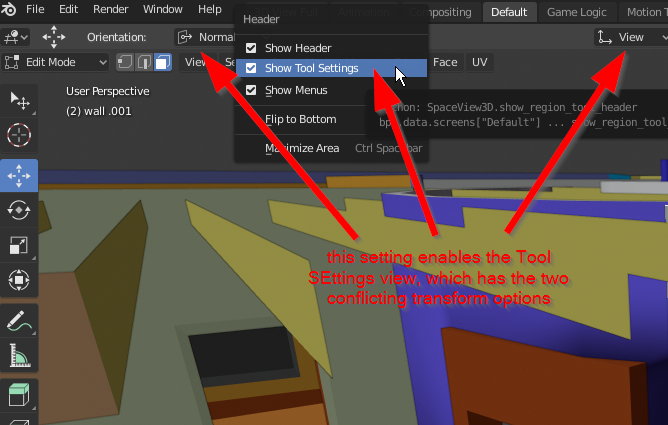
I have learned that there are two hierarchies of Transformation Orientation settings. There's the one you see in the Header, and there's the one you see in the Tool Settings area. The one in the Tool Settings area seems to override the one in the Header, but the Header is plainly accessible and seems to be the one that indicates primary use.
However, if you were to change the Transform Orientation setting in the Tool Settings and then hide that panel, the Transform Orientation settings in the Header would be overridden, and thus appear as though it isn't working. As Blender gets more user-friendly, I see this particular detail causing confusion to users who start exploring deeper layers of the interface without realizing this is a feature.
On balance, I have nothing against there being a hierarchy of control for Transform Orientation tools, and they are available to control from several places, not just the Tool Settings area. But I think there could be a clear, simple way to indicate that the TO settings in the Header are being overridden, both as a way to teach / reinforce the hierarchy, and give users more awareness / control over their preferred workflow.
2 Comments
I've just noticed this using shear to show something on another request. I was about to restart to see if it was a bug...{attachment Blender_12jpg}
Yeah! Perhaps good idea, I think, first one is extra, and is a lot of confusion.. Same orientation in 3d Viewport for gizmos and for using keyboard must be.. As some times, gizmos (tool bar tools) are showing in Viewport different and when we perform same operation with keyboard, different behaviours are there...