
Filmic behavior in cycles
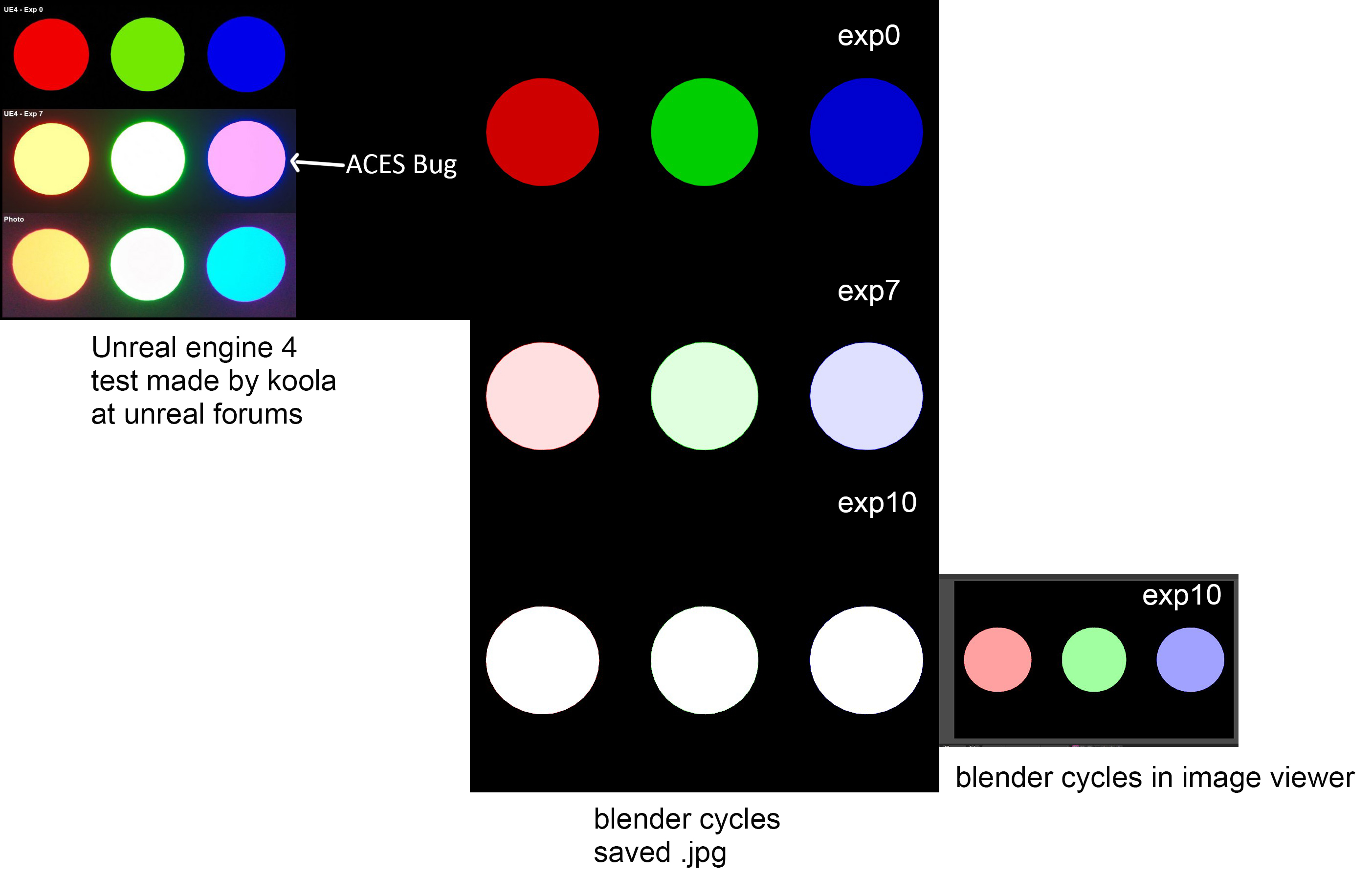
So over at unreal forums a user koola pointed out to an aces bug with color shifting issue that was present in unreal and should be currently fixed, also it was fixed in fstorm I believe by using some custom color matrix.
here's the thread: forums.unrealengine.com/development-discussion/rendering/112657-filmic-tonemapper-why-blue-become-pink-and-not-cyan
I tried to replicate his test to see how it works in cycles (using emmisive spheres and different exposures)
And found out few things.
1.There's not much color shifting happening with cycles at all when using different exposures
2.There's a quite a bit of discrepancy between how blender's image viewer displays exposure of 10 and how it looks in saved .jpg
I apologise in advance if this is somehow correct behavior but especially the differences between saved jpg and in viewer display looks wrong.
8 Comments
Are you sure this isn't something that should be reported as a bug, rather than a feature proposal?
@Jason van Gumster: I have no idea. I don't even know if it is something to be fixed in blender or a workaround needs to be made and aces will get fixed at some point...
@000kitbash: I'd suggest reporting it as a bug in the tracker on developer.blender.org . Worst case, the devs say it's expected behavior that needs to be worked around.
@000kitbash: And isn't that what Blender's Filmic color management is for ? Here's what I have with circles, RGB emissive shaders strenght 10, filmic color management exposure 2, saved in jpeg :
@loic.dautry: No, my point is that colors don't shift when using high exposures using filmic when they should. For example when you expose for blue light it will of course look blue for example, but as you overexpose, it should shift to cyan as shown in photo instead of pink as blender filmic does.
@000kitbash: Can you share a .blend?
@: sendspace.com/file/y7l8g9 there
looks like it is saved with "Save as render" unchecked. It happens to me to when rendering by command line EXR with preview enabled