
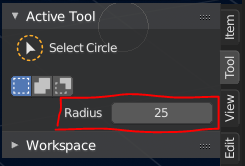
Circle Select - Change Radius Hotkey (Alt/Shift+MMWheel?) ... and make it a permanent change?
Hopefully someone can correct me and let me know of a way to change the radius of the circle select tool without having to go up to the radius value slider...
But the circle select tool really needs some kind of hotkey to change the radius, like the old circle select. Pls
EDIT * The LMB+MMW to change the radius feels very finicky. It doesn't change the radius size once I let go of LMB. It should really just make a permanent change once you scroll. ... and imo, not on LMB+MMW, but rather Alt+MMW or something, whcih would also make it easier on pen controls.
14 Comments
Would be nice if I can use F or some other hotkey for Tablet user to resize like how other brush in blender
* @whdiong * Yeah I guess. I still don't really like "F" to change radius, I'd much prefer scrolling, but I guess for pen controls this would be nice. Why not have both? :)
left click + MMB scroll to change the radius of the circle selection tool works in stable 2.80, maybe a little hard to do it with a pen on the tablet
* @NiCapp * What the... that's super weird. I expect it to just change the radius permanently instead of this weird temporary radius change. It "works" but I'd rather it just changed the radius value.
Also, if I hold down Ctrl I can't subtract and change the radius...
* @NiCapp * But thank you for letting me know. Didn't know that.
Agree, that is the weirdest shortcut in a while.
this is an old topic. When the 'c' key is pressed ,you cut set the brush radius temporarily.Then you can quit the mode by pressed 'Esc', and then the radius could become the number of the topleft number!
Ideally there would some way you can change the brush radius like in Photoshop as well. There you hold down a key/button and then move the pen/mouse to change the radius AND it should both persist and be possible to set it with just the tool selected not needing to actively being in the process of selecting something for it to work.
* @joel * IMHO you are offtopic, brush radius is far to circle select
If you choose Circle select via the keyboard shortcut 'c', then the plus and minis keys will change the radius size. This doesn't seem to work if the Circle Select tool is chosen from the tool bar though. I'm using an early release of 2.8 on a laptop things may be so may be differnent now.
* @Fugi * The "C" (old) circle tool will change radius also with MMWheel. At least for me... but not the new "Circle Select Tool".
* @penguinburger1 * yes but the C has no modal and you can't zoom change orientation or select mode V/E/F. so they should be the same and with C ctrl+scroll to avoid to zoom but change selection. I reported this maybe 6 months ago