
UI Consistency: Materials & Render Settings
When switching renderers (Eevee vs. Cycles), there's a discrepancy in the menus displayed inside the Shader Editor.
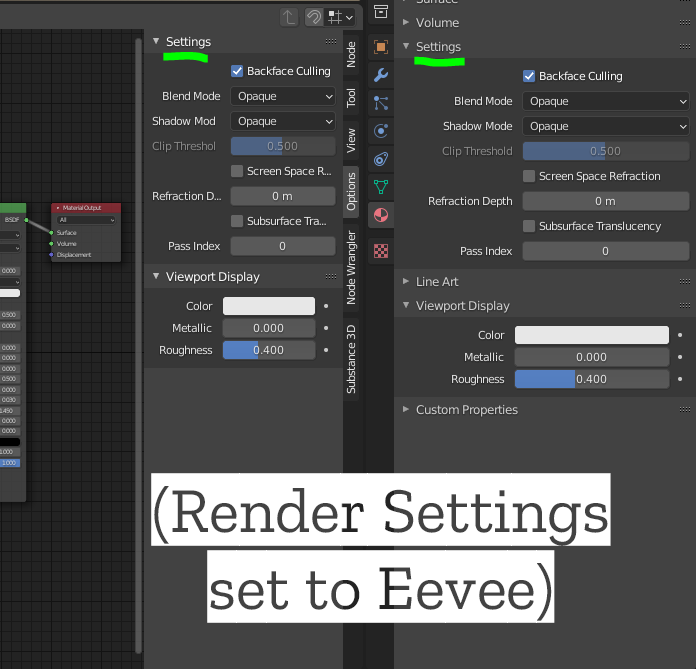
When you have the renderer set to Eevee, you have access to a 'Settings' menu that displays info about backfaces and transparency. However, when switching to Cycles, that menu disappears.
Yes, I know what you're thinking: "Yeah, but that's because in Cycles, you cannot cull backfaces and Blend Modes don't matter." To which, I would agree.
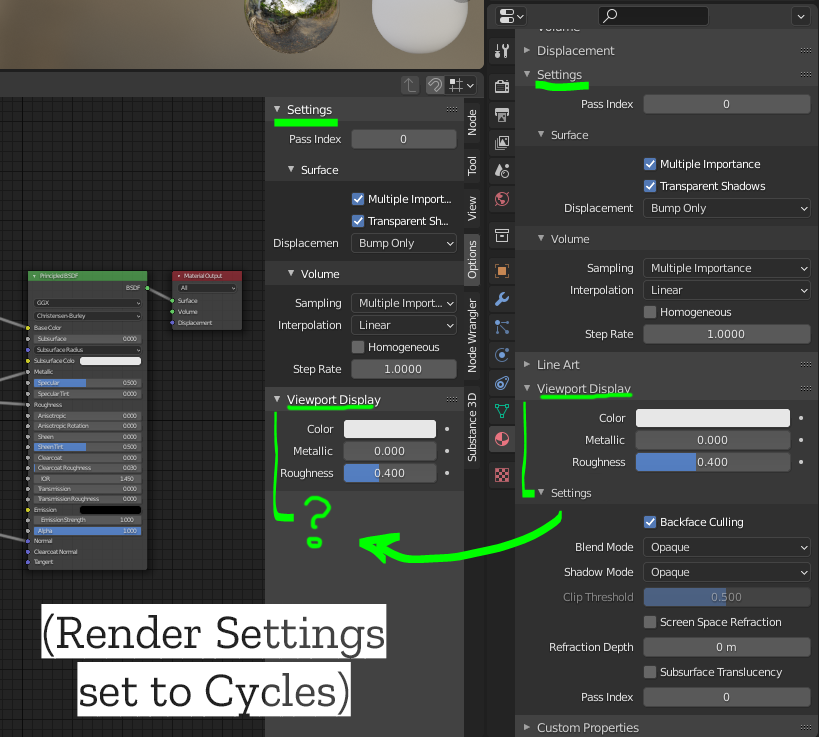
HOWEVER: Those menus are inconsistent between the Material Tab and Shader Editor as shown below:
When in Cycles mode, the Material tab submenu below 'Viewport Display', (confusingly called 'Settings' (again)), is completely missing from the Shader Editor. <see 2nd image>
This may not seem like a big deal, and it's probably considered a 'paper cut'. However, whole options disappearing based on 'mode' seems a bit like an anti-pattern for UI design and, at worst, makes it very confusing for a person who doesn't know the menu 'moved' to a new location just because they switched renderers.
For clarity, each screenshot below is taken directly from Blender. They are not composite images. Just a side-by-side comparison of the Material Tab & the Shader Editor side panel.
0 Comments