
2.8 Proposal - Perma-Pin/Isolate Properties Tab (Dedicated Tab Into An "Editor")
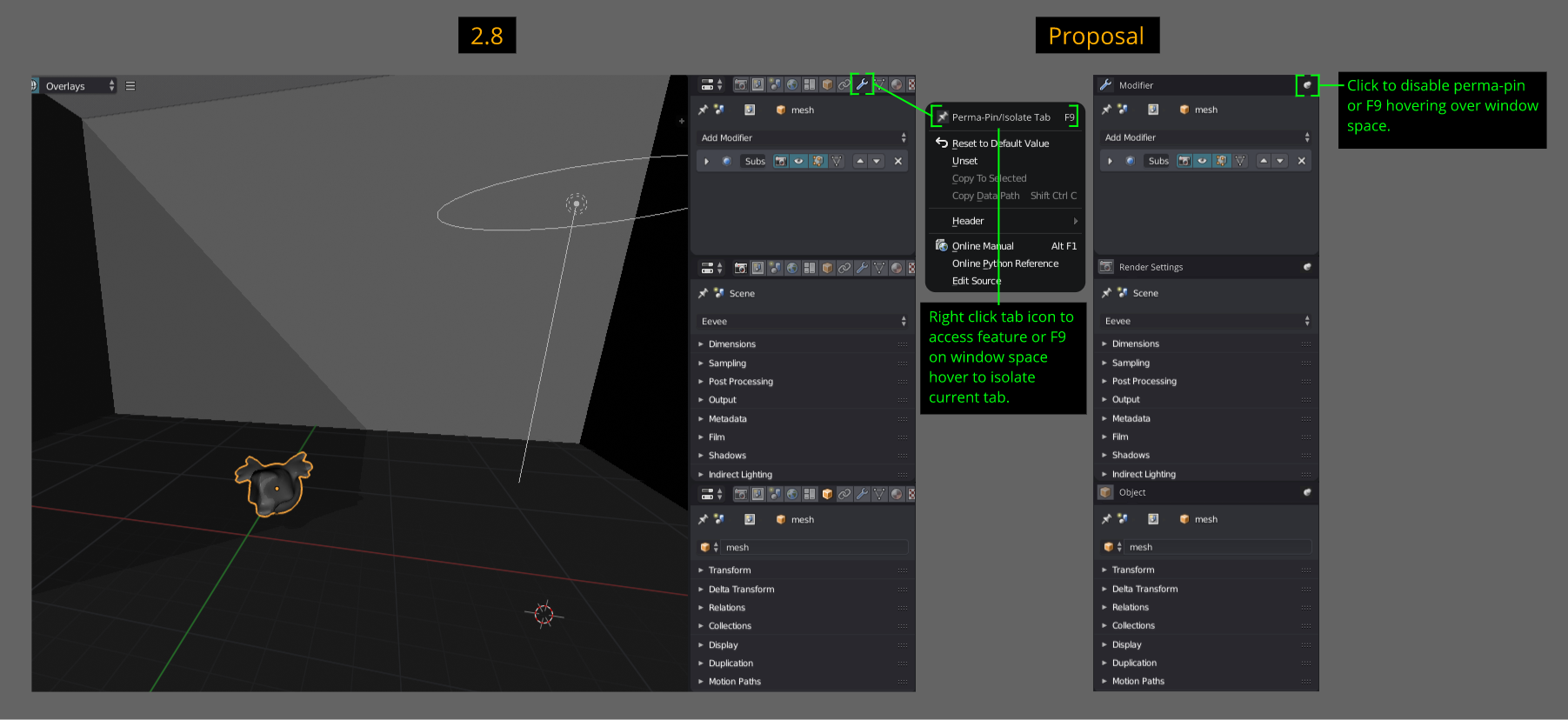
Edit: There seems to be misinterpretations. In the diagram below, the three perma-pins below in the example are NOT one "Properties Editor", not stacking. They are still SEPARATE three individual editors. This idea is to allow a user to make a Properties Tab into effectively a dedicated Editor for only tab you want. A ui implementation to have a tab to not change whatsoever for custom ui workflows, read details below to gain a greater notion why I propose this.
Issue/Problem: Sit. SIT!! Don't Move!!!
- If you have seen some of my previous proposal postings, I'm not very fond with the"Properties Editor" due to how congested it is (eg. containing both global and object settings) and the frequent on need basis to cycle through many of the tabs to fulfill minor tasks. Something I haven't covered is a particular behaviour this editor has. That aspect is the active changes to the window's content.
- What do I mean? When selecting different objects, the "Properties" window's content will change accordingly based on active selection which is perfectly fine. However, the issue I am presenting is lets say I want the "Modifier Tab" to be always present. Cool, so drag out another "Properties" window and set it to this Tab, problem solve? Not really. If selecting object types such as Bones/Lights, the "Modifier Tab" will change to something else since this isn't applicable to these objects. If you then select back onto an object with a modifier the tab will change back to the "Modifier". Cool, but where is the problem? If you select for example a Light the tab which you want to remain the "Modifier Tab" changes and then when you save your file, close and then reopen and select an object which a modifier is applicable to, that "Properties" window you want to designate only to the modifiers won't auto change back the "Modifier Tab" as you want. So you have to cycle back to it each time and need to be careful saving to retain that fixated ui element.
- This is obviously different to pinning a panel since that pertains to individual/local selection. What I am proposing is a universal/active selection fix.
Solution/Improvement: Staaaaay. Good Boy.
- Perma-Pin/Isolate Tab is a feature accessed via RMB the "Properties" icon you want to permanently stay or F9 mouse hover over window. See diagram below.
- The idea of this is to prevent selected objects that certain tabs have no association with (eg. Modifiers - Lights & Bones) from changing. In this case they will indicate to the user the active selection(s) that you can not apply modifiers to them by greying out/unselectable or a message communicating you can not apply modifiers to this object(s).
Additional:
- I just assign F9 because that had to do with the header and it did nothing in the "Properties Editor". Any other suggestion are fine, recommend a single key press.
- For now only discovered via right clicking the icon because new users might shit themselves if they accidentally click a icon to activate it and do not know how to change it back.
Any suggestions are welcome to make this better. I'm just done cycling through the tabs, especially during rigging with bone constraints, armature and bone tabs.
3 Comments
Or just open multiple properties windows ?
It seems more convenient to me, you can switch the areas when you need to, resize them, use your screenspace for the area you want only instead of having everything on the same stack. Try to display the same things as me with your solution : you can't, because all the panels will be between and you will run out of screenspace unless your spend your time on moving out panels all the time for every modification.
The problem of properties tabs changing on object types won't be solved by your solution: there won't be a modifier stack no matter how you display it. The actual solution would be to make these tabs persistent, but IMO it's not a good idea either.
@loic.dautry: No no no no no no no. You are misinterpreting what I'm suggesting. In the example above all three of the perma-pin are still SEPARATE "Properties Editors", they are NOT stacking under one "Properties Editor". I just perma-pin three things to showcase how they look. Of course it would be inconvenient and you run out of space if you perma-pin EVERY "Properties Editor" tab.
In my current ui workflow on my right sidebar I have TWO "Properties Editor" open. The top one solely for the modifier tab and the one under for everything else that expect to behave as it currently does. What my proposal is to allow a user to dedicate ONE "Properties Editor" to only one tab, effectively making it a "(insert a tab) Editor".
I want Blender to know only THIS "Properties Editor" is dedicated to this tab, no matter what, even selecting objects that are not applicable to it. Have you read the part about selecting non-modifier applicable objects, saving the file, reopen tab issue?
yes I did.