
Add shortcuts to toolbar tooltips
In menus, we can see if a tool has shortcut
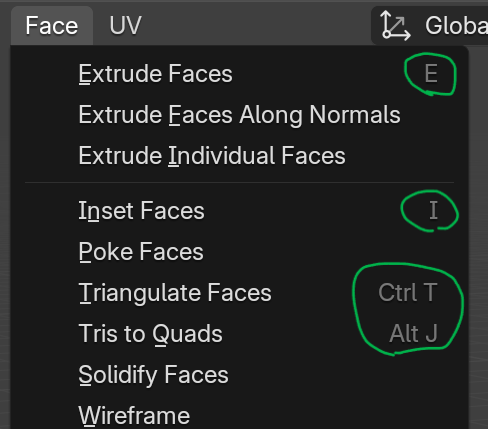
PROPOSAL
I think it would be very useful to see them also in the toolbar tooltips, both in contracted and expanded form:
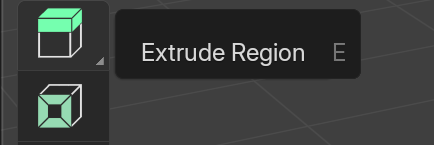
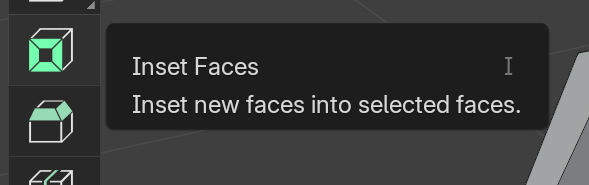
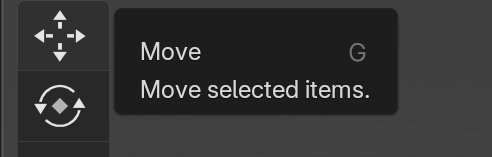
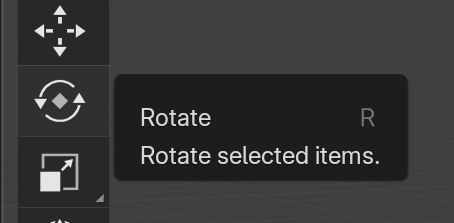
In menus, we can see if a tool has shortcut
PROPOSAL
I think it would be very useful to see them also in the toolbar tooltips, both in contracted and expanded form:
5 Comments
I can see shortcuts in my Blender : imgur.com/a/XzDfWLx
Using 4.3. I've been using Blender only for few weeks, so I don't know if this is some new update.
I am using 4.3 aswell but don't have that tooltip you are showing, but the one at the top at select box. And only that one. Non other even in edit, scult or any of the paint modes.
It's been there since 2.8 afaik. That being said, the shortcuts are different depending on your keymap (at least the spacebar usage, maybe even left vs right click setting). If you don't have some of the tooltips, then please use the menu Help > Report a bug. That doesn't sound normal x)
I have to point out that the shortcut you show on the toolbar's tools are incorrect.
G, R and S are the shortcuts to call the modal operators grab, rotate and scale. Modal operators are active only when you run them, only on what was already selected, and stop once you confirm or cancel them.
The tools in the toolbar are their separate thing, which changes the gizmo and how you interact with the viewport passively, without waiting any other input from you.
With Left 🖱️ select and spacebar set to playback, the move/rotate/scale tools have a bit of a different shortcut:
I thought the same at first, but actually, when the Keymap Preference "Tool Keys" is set to "Immediate", G/R/S toggle the tool. So it'd make sense to show the shortcut in the quick tooltip then.
Sounds a bit tricky to do though.