
Different Python Classes for Custom Node Color Tag
When using custom nodes with Python, the color tag is stuck on INPUT, and the color_tag property is read-only. There have already been many requests for making this property writable, but since the color tag is for node types, I think it should be part of the node class that is being subclassed for the custom node. Basically, changing the defualt color_tag of the bpy.types.Node class to "NONE" (which is the dark green tag for group nodes)
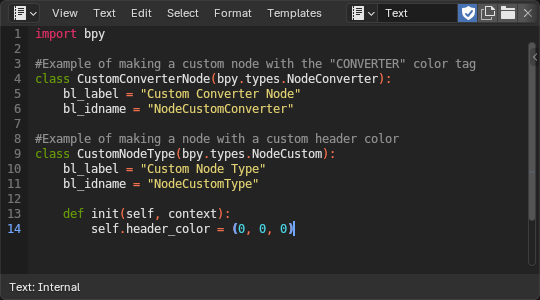
, and then adding other classes such as bpy.types.NodeInput with a color tag of "INPUT", bpy.types.NodeConverter with a color tag of "CONVERTER", and if possible, bpy.types.NodeCustom with a custom color tag value, as sometimes a blender node addon may require a new category that does not exist in the built-in color tag menu. This could be implemented by adding a new "CUSTOM" enum item to the color tag menu in blender's C code, but using a float vector property of subtype "COLOR" to define what color it will be instead of a fixed value, and of course adding the extra node class types like bpy.types.NodeVector, etc., and using the C code to set the default color tag values for the new node class types accordingly, and making it a writable color property for bpy.types.NodeCustom. Below is an example of how it could be used.
0 Comments