
New snap vertex Distance Closest to Mouse Cursor (not 3d cursor) to second vertex closest to mouse distance (second position).
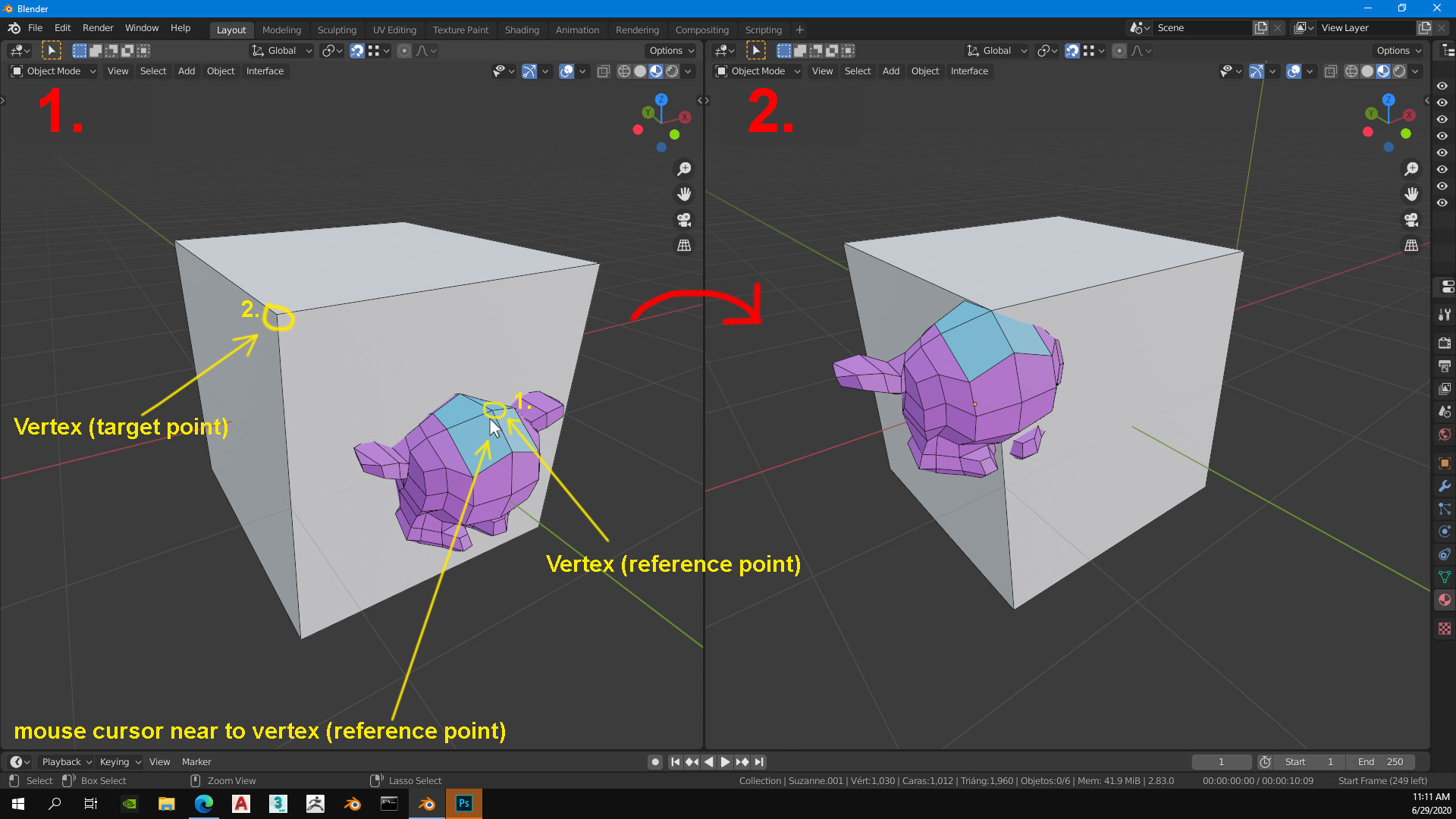
Hi, I propose this new "Snap, mode or pivot point" for someone to see and develop it (Blender foundation, it would be great). The idea is that this works in object and edit mode. The command detects the vertex closest to the mouse cursor.
- select object
- places the mouse cursor nearest to the vertex (the one you want as a reference point)
- G (Grab)
- move to the second vertex position you want to move the object (again vertex closest to the mouse cursor)
- Click and finish
This improvement is very useful to reduce the time to work faster.
15 Comments
already in development
* @Pawel Piotrowski * Wow, I like this. This is great, perfect. Thank you.
developer.blender.org/D9415
It will work in slightly different way than gif: As an transform snapping mode, and not separate operation.
base point is absolutely must have. for now fast solution is to snap by active in edit mode... imgur.com/qxRgK9V
* @impacman * thank you very much if i know, but the pivot changes location
* @Jhon Rincón * yep..(
* @impacman * look at Pawel's Reply. Already in development. That's exactly what I want
* @Jhon Rincón * for now u also may use cad transform addon youtu.be/vhm_b-YVdK4
* @impacman * Thank you, i will try it
* @Jhon Rincón * that just means you have to do more steps as a workaround :(
* @thinsoldier * I'm waiting for base point too, comrade)
How about, use the measure tool, activate snapping, click the vert on the money head and drag a line to the vert on the cube, then press a hotkey that performs the movement?
* @thinsoldier * That sounds good too, the problem is when you need to do that operation constantly and continue in object or edit mode without going to Measure tool. Your idea for now is good.
i think both reference and target vertex will be choosen based upon vertex under cursor.
I have made another proposal for this type of problem, please give a look here: blender.community/c/rightclickselect/Ex6g/ Also there should be a setting (like poly count/zoom level) where if the mesh is very dense, it will either stop it as blender can hang/crash or it can zoom that area temperorily.