
Bevel Mesh filter for the sculpting mode
Update*
So I did my research and the community downvoted this request for the right reason. When remeshing the raw model the high poly count producing a thin bevel line, just as needed. The smoothing mesh filter next polishing it just enough. Also, alt+A for the Face sets automasking, where you can find automasking for the boundaries. Aaaand, you can use a dirt mask, then use a mask to face set and that basically will give you bevels as separate fae set.
Thanks, people :)
Hola, community. The sculpting is getting better and better, kudos to developers!
Can we have a mesh filter for beveling sharp edges in sculpt mode? The current Smoothing mesh filter is too harsh and rounding the whole model.
My childish suggestion of how it could be implemented:
- Create face sets using sharp edges of the model
- Remesh the model preserving the face sets
- Shrink individual face sets by X value
- Smooth the model preserving the face sets
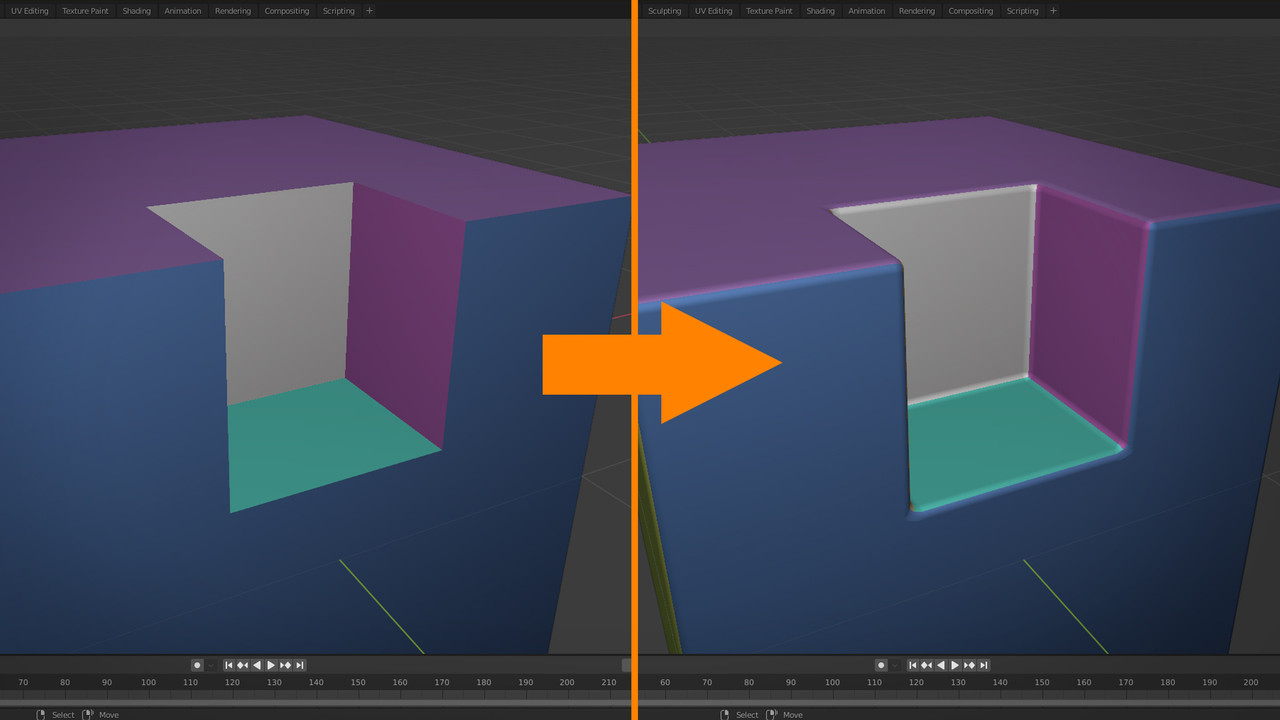
As far as know shrink all face sets at once isn't an option right now. The same goes for creating masks from all face sets. But I think having a Mesh filter for Bevel would be even better.
4 Comments
Well, gives me the idea for a slightly different proposal: a filter dedicated to chamfer all sharp edges in a sculpted mesh. ZBrush has something like this, but it's based on polygroups (face sets).
Interesting in why it's downvoted. It's the kinda solution already? I don't use such technic so don't know
* @impacman * I see this kind of downvoting for the first time here, Maybe requested feature is already implemented?
* @Buster Friendly * Oh, yeah I see know it is possible with the current build.