
Even width option for sharp Splines
Come 2.9 I'm ditching After Effects and using Blender for all my motion graphics work. I'm slowly transitioning my workflow over now, and noticing a lot of little things that don't behave quite how I would expect. This is one of those things.
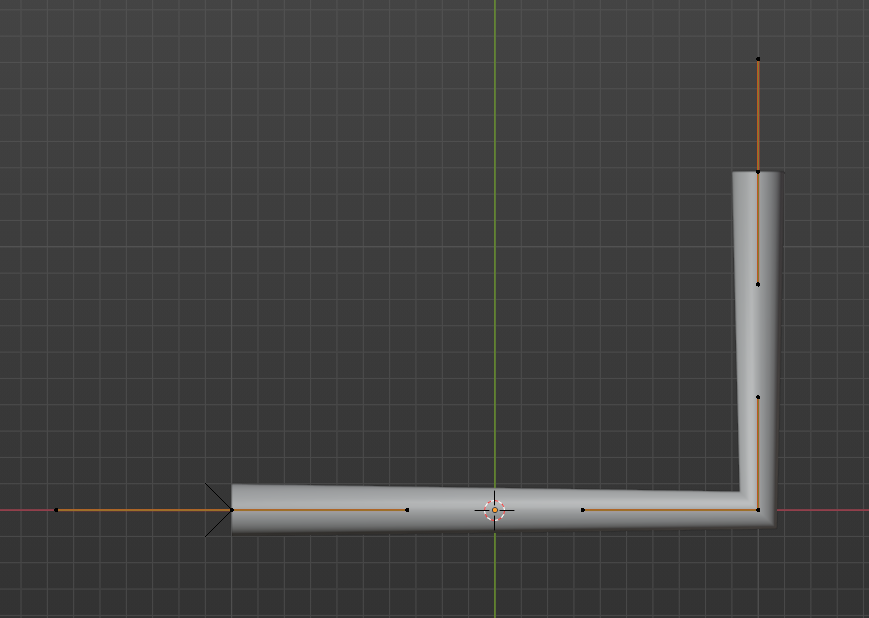
Normal curves are smooth and work great, but when made sharp they "kink," and look really ugly. I do a lot of info graphic style animations, so things like this are something I do quite often. Having better handling for this would help a lot.
9 Comments
If all the control point are planar, you can set the curve to 2D and the radius will be even. The result is wacky with obtuse angles though
The radius of the cross section is still the same as the rest, but rotated 45 deg.
If you select the vertex and set the radius to the rotated cross section (Math says Root 2, or 1.414 at 45 degrees) it should fix your kink.
* @ammusionist * Not fix
* @IIIFGIII * Ooooh. A whole other dimension of yuck!. Sorry to lead you astray.
Duplicate
"ditching After Effects and using Blender for all my motion graphics work" but how do you live without the ability to mix blending modes between different "layers" in the viewport?
* @thinsoldier * Compositor works great for that. Even if it's a little slower, its not worth Adobe's $50-60 a month.
* @Zach Hixson * Compositor is unusably slow on my 2 laptops for something as simple as a little bit of blur.
* @thinsoldier * It's fast enough on my computer to make it worth it