
Auto Length option for Stretch to Constraint
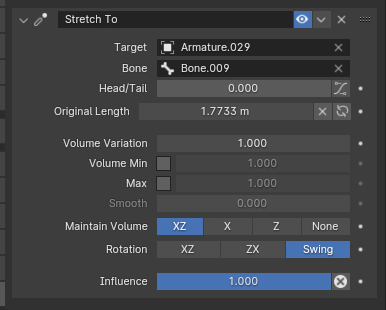
The "Stretch to" constraint has an Original length option, which is constantly being thrown off when you change the size of the bone on which the constraint is applied.
yes, there is a "Reset Original Length" button, but it is not that convenient. in most cases you will apply the constraint to a bendy bone, which does not require you to change this option or interact with it in any way in order to function
I suggest adding an "Auto Length" switch next to the "Reset Original Length" button. it will automatically update the Original Length when you change the bone in edit mode that the constraint is on
1 Comment
Seconding. Stretch bones are incredible. But I'm confused by the original length slider. Because I struggle to imagine a scenario where I or anyone would want the stretch bone to be tuned to a different length than what the original length is. So the original length should be automatic and defaulted. And then if someone wants to change the value, they can toggle it manually and do what they have to do. But certainly, the most common use for this bone is to have the original length set automatically.
It takes an a tedious amount of time and effort to go through every stretch bone and click the little X button. Stretch bones are very powerful, and using many of them in a single mesh can get some pretty nice results. But the more you use, the more lengths you have to reset every time you edit. The time really adds up.