
blender panic button
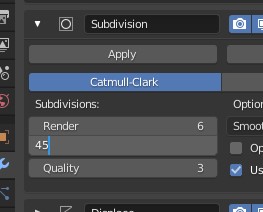
It has happened to everyone I believe. Typing a wrong value in a field, maybe pushing a modifier too much. And blender becomes unresponsive. the only solution is killing the blender process, hoping a recent save exists. It would be very helpful if we had a panic button (or simply hitting the esc key a couples of times) telling blender to drop everything it does and become responsive again (undoing the latest change maybe?)
13 Comments
Or instead of trying to cancel the operation after the fact add a warning confirmation to certain modifiers or operations that pops up before it runs if you enter a number larger than X or if the mesh in question has more than Y faces already.
In the case of subdivision a dead-simple arithmetic calculation can be done using the number of faces of the active mesh to find out the number that will result if the operation is allowed to proceed. If the resulting number is above some threshold (like 500,000 or a million or two or something) then ask for confirmation first, else do the operation as normal and don't bother the user.
"Hey are you sure you meant 45 levels of subdivision? That's a LOT and could freeze Blender. [Yes] [No]"
Maya has this type of warning when you attempt to toggle into "Smooth Mesh Preview" on any mesh that has more than 15,000 faces (it applies three levels of subdivision to smooth previewed meshes so that would be 960k). The threshold number of faces that triggers the warning is user-configurable.
* @Chris Kohl * yes, that check might help, but still, i think i would prefer being able to cancel when i see something taking longer than i would like
* @aombkappa * That's a good point. The warning would probably prevent many accidents but it would still be useful to have an interrupt to cancel.
I'd like a performance warning on operations that could prevent for example circular reference with collection instances.
Just had this exact problem where I had a mesh selected, attempted to apply a Solidify modifier but accidentally chose the Skin modifier. Had no recourse but to kill Blender.
* @jim.conrad * yes it happens, and most of the times i dont remember when i last saved(how much work i will loose) in order to decide if i kill it or go for a walk and wait for it to finish
my solution for subd is to use simplify on render properties panel
Ctrl-C in the console works for Python scripts at least. Always start Blender from the console!
* @Josephbburg * nice side tip, thanks
* @ Josephbburg * Using Ctrl-C will leave the operation in a dirty state and you need to do any clean up manually. I think it's just Undo, but still...
Isn't this called a "Cancel" button in other software?
I can't tell you how many times subd modifier has made me follow this flow when adding it to a complex stack: Hang, wait, close the task, re-launch, File / Recover / Auto Save... and hope it's fairly recent. So much time wasted without the ability to stop the process and undo.
Awesome advice