
"Only Show Selected" in Dope Sheet Still Shows Keys From Unselected Items
Context:
I am using Blender to edit a video and I'm using the Dope Sheet to do some fine tuning on some animations. The "Only Show Selected" checkbox is not acting as expected.
Expected Behavior:
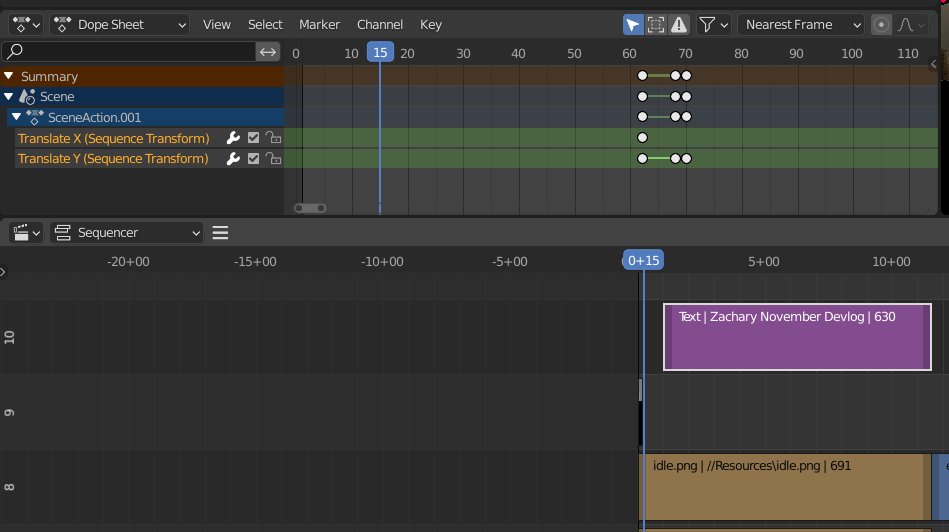
When I select an item I'm expecting to not see any keys at all from any other item.
Actual Behavior:
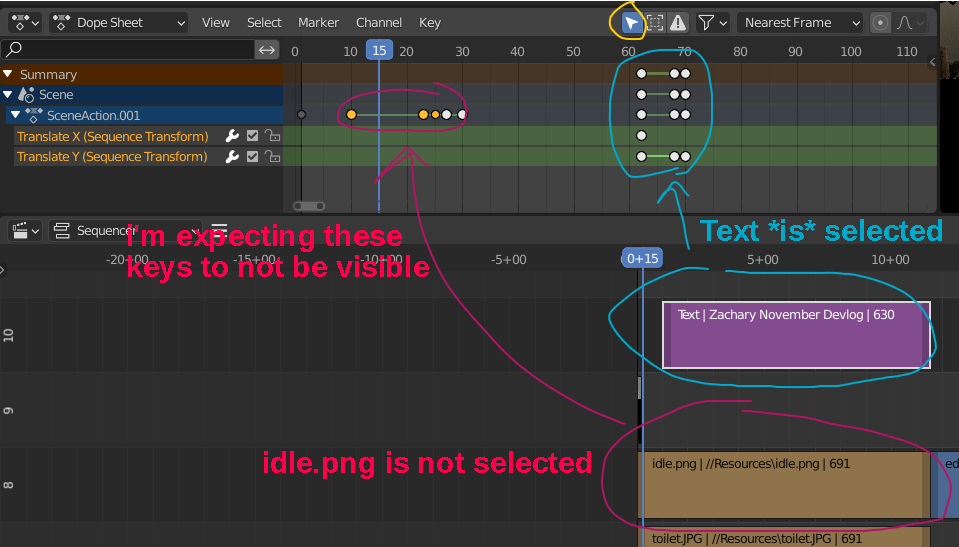
I have two items with animated fields. "Text" and "idle.png". When I select "Text" I can still see some of the keys from "idle.png" in SceneAction.001 even when I have "Only Show Selected" checked.
Ask:
When I select an item I'm expecting to see absolutely nothing from other items. This way I can focus just on the item I'm trying to animate.
Illustration:
This is what
I am not
expecting.
This is what
I am
expecting.
8 Comments
When I said to post it here, I didn't mean to copy&paste, but modify into proposal ... Your title and description is not clear to me and gif is very chaotic. Simple two screens of current situation and screen with mockup of desired result would be enough. ... Just my recommendation to catch more audience.
I've updated my proposal! I hope I've eliminated the chaos factor lol. Let me know if it still isn't clear.
Mutch better!
Maybe that could be reported as a bug :o
When selecting object with keyframes in the viewport, Blender does filter out the parent category's key ticks accordingly in the dopesheet, but this doesn't happen with video strips. in terms of UI consistency, this should not happen. So I'd suggest you to try using Blender's menu Help → Report a bug. Maybe that will be fixed.
I spotted the same ... but thing is that each object has its unique "ObjectAction", but all strips stores data inside only one "SceneAction" container ... so I would say it is the reason why it is still visible ... so from this point of view it keeps consistency.
Thanks for update .. I thought your issue is visibility of all up level keys ... that disturbs me, so I can imagine to make then de-highlited imgur.com/JhAL7GD or completely hidden and make them visible when collapsed specific level imgur.com/22OV5iY (here with kept just for Summary)
I'm not super familiar with Blender, so I can only speak as someone who's new to it. But I'd really appreciate if the other keys were just not visible. Dimming them would still be better then it is now though. But again I'm not aware of how it would affect other things, or what seasoned Blender users would prefer.
use the markdown code to insert pictures:
I need this. Show only selected should have an option to only show last selected item. If I have animated properties over 5 materials and 2 geometry node groups. Then I select just one from my current view, and all animated properties show up because if I enter their view the animated property is selected. It is time-consuming to go through every view each time deselecting each node just to access one property. Not to mention the fact shape keys are always included in the "only selected" option. Viewing key frames becomes a mess quickly with multiple animated properties. My only option is to solo each property I want to animate, but that requires finding it in the channel stack meaning you need to memorize the name and location of each animated property.