
Double/Half the value of an input field when shift-clicking on the side arrows
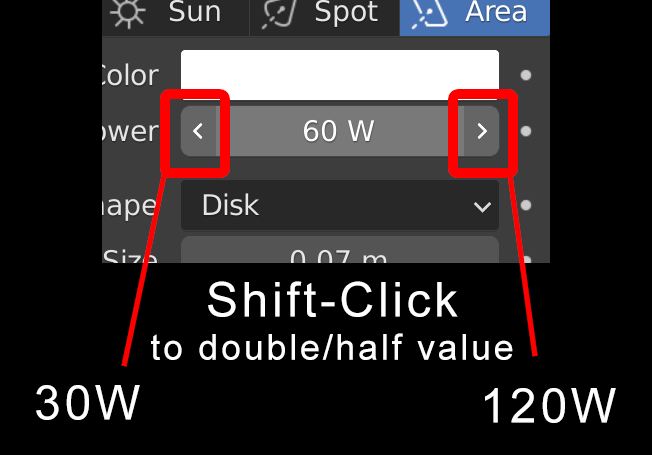
Yes, I know you can enter
value * 2
or
value / 2
into the field. That takes too many clicks and keystrokes.
Yes, I know you can enter
value * 2
or
value / 2
into the field. That takes too many clicks and keystrokes.
7 Comments
Yes. Please make double/half UI operator.
Maybe Ctrl instead of Shift? Shift is used to smaller increments in Blender. Also [*] and [/] keys could work on mousover.
Whatever its gona be mapped on by default it would be definitely very useful quality of life improvement. Doubling or halving value is quite common operation that i do.
Maybe some [*] and [/] keys could work on mouseover, good point, but definitely not
Shift...Maybe bether is to build some solution to create "combolists" for some of this type values saved as some pref/configurations ?
This design doesn't make sense for me. I would prefer a dropdown with preset intensities for artificial and natural sources.
What are You even talking about?
This is about general solution for every number property like scale, factor, rotation etc. and not this specific value of light strength.
Right, in this case it might be something I never knew was missing and could get addictive :) Changed downvote to up!
Sorry - 1 ... I don't want to see it in Blender, I'd rather used possible
Shiftmodifier for something else, 100% not for this.We already have
Shiftfor adding lesser increment value while moving sliders. It could be logically to have sameShiftwork in same way when clicking arrows - adding single 0.01 (or something else, depending on variable) to current value. Same aboutCtrl- if it add value with bigger increments step while moving slides, it has to add single increment if clicked arrow.What proposed is totaly outside of Blenders current UI/UX logic + I can't remember any cases when I needed to double values and it was so common case so I dreamed to have it as a hotkey something.