
Proposal - Panel Pinning 'Pin Bay' (Properties Editor)
Problem/Issue: Frequent cycling between 'Properties Tabs'
- Viewing and accessing necessary information is vital to accelerate workflow. Repetitively alternating the Properties' tabs to relay & adjust specific settings to tweak overtime can be irritating & at most importantly, inefficient.
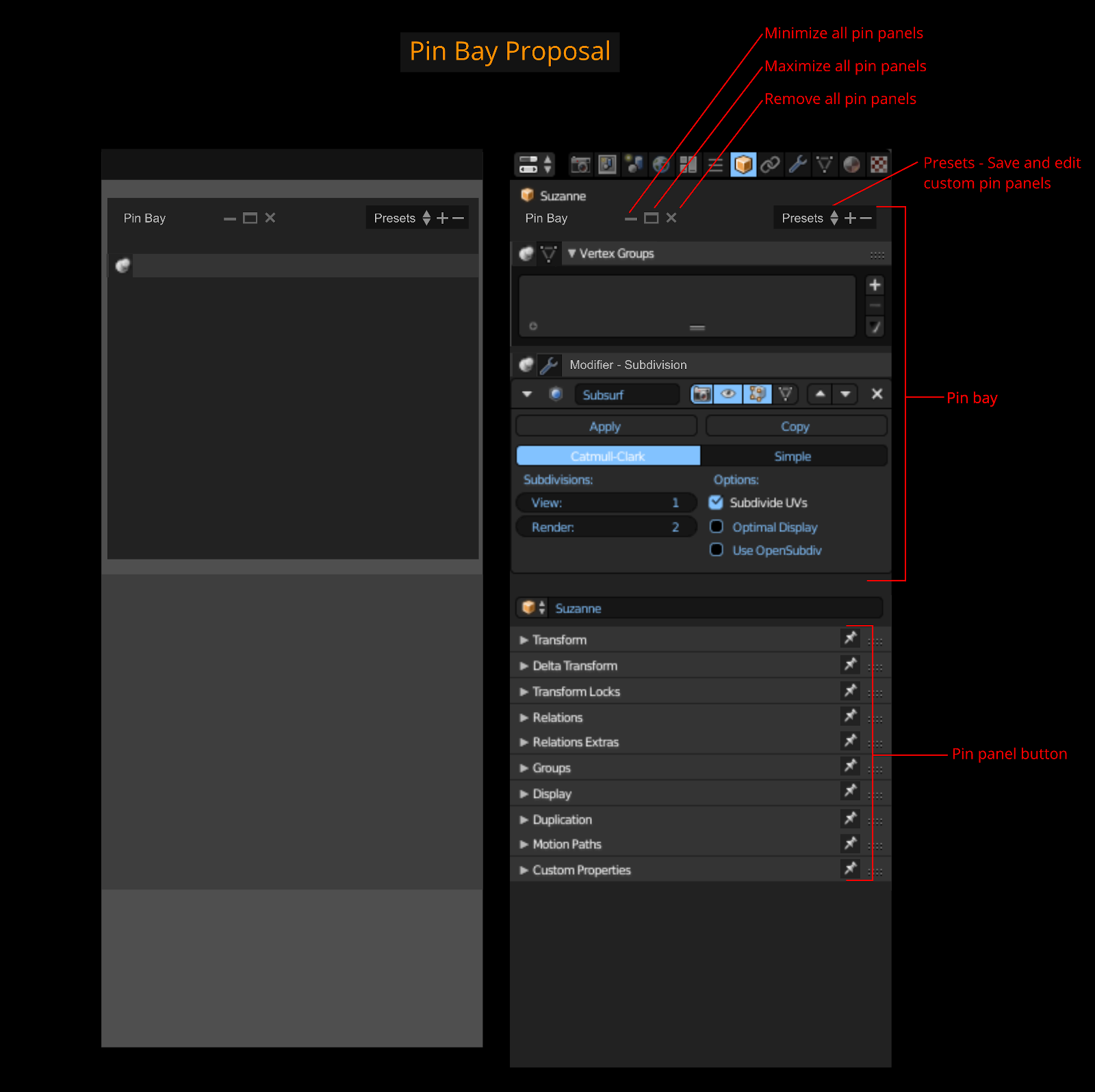
Proposal/Solution: Implement a 'Pin Bay'
- A Pin Bay is a designated area located at the top of the properties tabs window. Its function is to pin panels from any other properties tab. This is handy because it can reduce switching between tabs to access specific settings whilst still having access to all the panels in the current tab.
For example you want to have access to all panels in the 'Object Data' tab but you need to have lets say the 'Solidfy' modifier options from the 'Modifier' tab and the 'Display' panel from the 'Object' tab. Simply pin the 'Solidify' modifier and 'Display' panel to the bay. When you cycle all the tabs, they will remain at the top. You can switch to the 'Object Data' tab and have all the panels available and have access to the pin items without cycling back and forth to their respective tabs.
3 Comments
I was just thinking this, and glad to see I'm not on my own. The old way of pinning panels in the Tools sideshelf in the 3D View makes sense, also in Node Editors like in Bfa - so having pins on panels for the Properties view would be... VERY HANDY. I am highly for this.
Softimage has had a system for that in properties view window, one is refresh pinned panel on specific object (lock), the other is pin property panel and refresh on object change (watch) and the other is the normal panel that changes when you change the tab/selection.
Instead of pinning a whole properties tabs with all panels of that particular object, it would be great to be able to pin only specific object panels or watch certain panel types and pin them accross tabs.
Generally a good Idea - but not at the top of the panel please! Thats where I want to see the items of the current Tab. Even when you can minimize it - it's just a weird design.
Maybe In a designated "Favourites" Tab.
@Simon Storl-Schulke: hmm true, maybe add the "Favourites tab" above the "Render tab" as seen in William Reynish's vertical header template:
dev-files.blender.org/file/data/ejied6zrsqntdddi3qpl/PHID-FILE-u4qtz72cjn2wi4rsjhyi/Screen_Shot_2018-05-05_at_13.11.28.png
or maybe even dedicate a "Favourite Pins Editor" so you can have all your pin panels shown without them over-bloating the "Properties Editor's" panels.